
A Few More Axes
Creator: TheAxolotlLord · 2026-05-30 · Mods · Free on Eaglercraft Studio
Download A Few More Axes — free Minecraft mod. Created by TheAxolotlLord. Tagged axe, axes, funny, minecraft. Check the file details for Forge, Fabric, or NeoForge before installing.
Creator notes
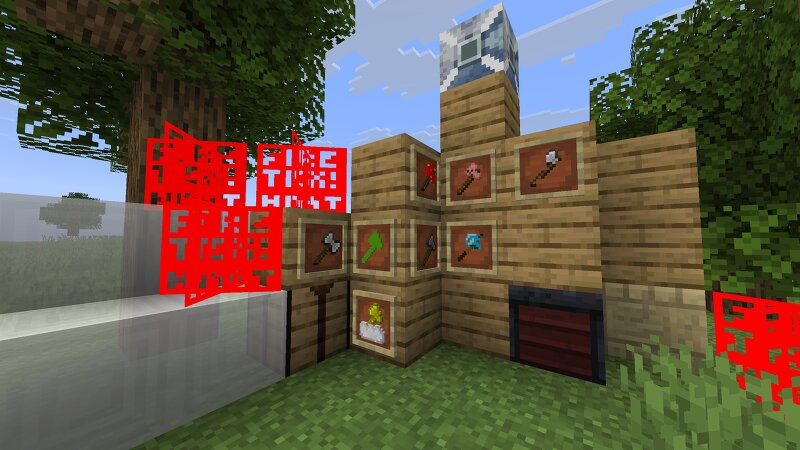
A Whole Lotta Axes This is the A Few More Axes Mod, beind a sequel to the Just a Few Pickaxes mod. I've come a long way already and am proud to show it! No updates are promised. This mod is not live-service. What's in it? Stripped Wooden Axe: A worse but brighter Wooden Axe (in block form, too)! Saxepling: Where a Axe meets replanting their enemy. Iron Hatchet: A double-sided blast to the past, seeming like a battle axe. Taxe: When you own less than 50% of an Axe, and the rest goes to... someone? Condensed Axe: When everything doubles in size, it's really... explosive . Condensedered Axe: When everything doubles again, it's really... gone. And tiny. Potato Axe: Give you the Potato Effect, spawning tons of potato and making you lose all balance. Potion works on nearly all mobs. An Actual Fire Axe: Is your fire animation not loading? Have no fear, this axe is fire! Honestly! Can make floating fake fire. Pigaxe: With the essence of the pigs, you can make EVERYTHING a pig. Everything. Do not hit the Ender Dragon. Lightning Axe: Strikes you down with tons of propulsion. John Cenaxe: With Air (that floating you up), you can become INVISIBLE, like the man himself! Sacrifical Item Tributat
Added value
What’s included on this page
Preview, categories, compatibility, and tools on this page — not a bare file mirror.
- Creator
- TheAxolotlLord
- Source
- Minecraft downloads library on Eaglercraft Studio
- Type
- Minecraft mod
- Price
- Free download on Eaglercraft Studio
- Curation
- Listed with credit to TheAxolotlLord · studio preview & install guide
- Game Version
- Minecraft 26.1.2
- Compatible with
- Minecraft Java (match version / loader in facts)
- Tags
- Axe, Axes, Funny, Minecraft, Mod, New Content
Install guide
How to install this free Minecraft mod
Eaglercraft Studio listing with metadata, creator credit, and loader-aware install guidance.
- 1Download the jar/zip when available.
- 2Install the matching loader (Forge, Fabric, or NeoForge) for your Minecraft version.
- 3Drop the mod into your mods folder, then launch with that profile.
Wrong loader or game version usually crashes on startup — read the facts on this page first.
Related free mods
More curated mods from the same library section.

Pastelmooncrafting15 · 67 diamonds · 20 views

PotatoWolfie · 60 diamonds · 2 views

PotatoWolfie · 53 diamonds · 622 views

Janss_33PL · 47 diamonds · 940 views