
AcousticKey
Creator: MinexInd · 2026-09-11 · Mods · Free on Eaglercraft Studio
Download AcousticKey — free Minecraft mod. Created by MinexInd. Tagged keyboard, keyboardsound, minecraftkeysound, minecraftsound. Check the file details for Forge, Fabric, or NeoForge before installing.
Creator notes
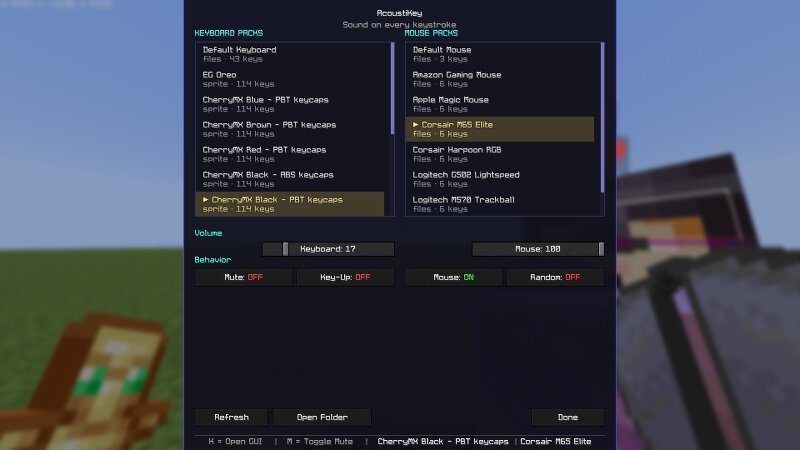
AcousticKey Every keystroke, now with a thock . A client-side Fabric mod that plays mechanical keyboard and mouse sounds as you type and click. No server install, no background app — just drop it in mods/ and your membrane keyboard starts sounding like a custom build. Why AcousticKey? Most "keyboard sound" setups mean running a separate desktop app that fights Minecraft for your audio device. AcousticKey lives inside the game instead: it hooks key and mouse input directly and plays sounds through the game's own audio engine. That gives it three properties a background app can't match: AcousticKey External app Setup One jar in mods/ Install + configure + autostart Latency Plays on the input event itself OS-level hook, then audio routing Per-game control Mute key, volumes, pack picker in-game Alt-tab out to change anything Controls Both hotkeys are standard Minecraft keybinds — rebind them like anything else under Options → Controls → AcousticKey . Action Default Notes Open settings K Works from title, world, or inventory Toggle mute M Instant, no menu needed The settings screen footer always shows your current binds (e.g. J = GUI │ N = Mute ), so it never lies after a rebind. Settin
Added value
What’s included on this page
Preview, categories, compatibility, and tools on this page — not a bare file mirror.
- Creator
- MinexInd
- Source
- Minecraft downloads library on Eaglercraft Studio
- Type
- Minecraft mod
- Price
- Free download on Eaglercraft Studio
- Curation
- Listed with credit to MinexInd · studio preview & install guide
- Game Version
- Minecraft 1.21.11
- Compatible with
- Minecraft Java (match version / loader in facts)
- Tags
- Keyboard, Keyboardsound, Minecraftkeysound, Minecraftsound, Other, Sound
Install guide
How to install this free Minecraft mod
Eaglercraft Studio listing with metadata, creator credit, and loader-aware install guidance.
- 1Download the jar/zip when available.
- 2Install the matching loader (Forge, Fabric, or NeoForge) for your Minecraft version.
- 3Drop the mod into your mods folder, then launch with that profile.
Wrong loader or game version usually crashes on startup — read the facts on this page first.
Related free mods
More curated mods from the same library section.

Pastelmooncrafting15 · 67 diamonds · 20 views

PotatoWolfie · 60 diamonds · 2 views

PotatoWolfie · 53 diamonds · 622 views

Janss_33PL · 47 diamonds · 940 views