
Advanced Spawner
Creator: Zensiyoo · 2026-01-19 · Mods · Free on Eaglercraft Studio
Download Advanced Spawner — free Minecraft mod. Created by Zensiyoo. Tagged functional. Check the file details for Forge, Fabric, or NeoForge before installing.
Creator notes
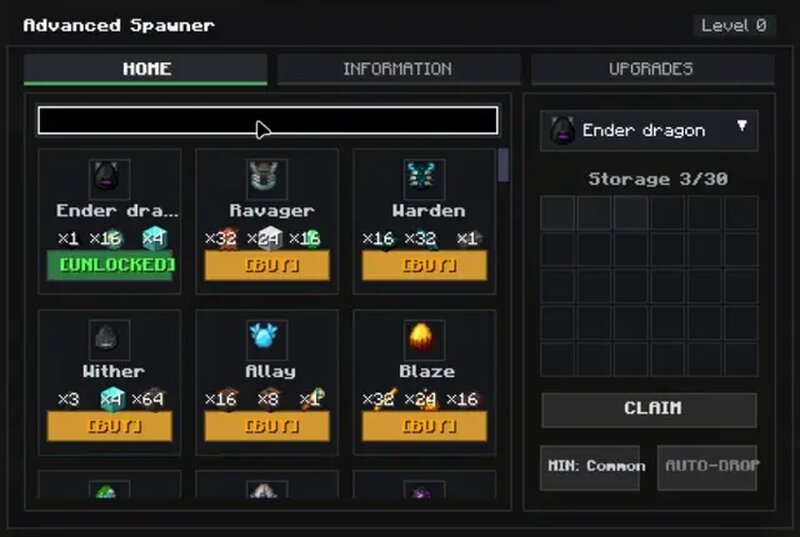
🌌 ADVANCED SPAWNER │ ├─ ⚙️ Main Functionality: │ ├─ 🧟♂️ Automatically spawns mobs that YOU purchase from the spawner menu │ ├─ 💎 Generates and collects mob loot over time directly inside the block │ └─ 📦 Works as a full simulation block — spawn + loot + storage all-in-one │ ├─ 💰 Mob Purchasing System: │ ├─ 🛒 Buy mobs directly inside the spawner interface │ ├─ ⏳ Each mob produces drops over time as if naturally spawned │ └─ 🧺 All loot is automatically stored inside the spawner’s inventory │ ├─ ⬆️ Upgrade System (Level 1 ➜ 15): │ ├─ 🔓 Unlock higher rarities as you upgrade: │ │ ▪️ Common │ │ ▪️ Uncommon │ │ ▪️ Rare │ │ ▪️ Epic │ │ ▪️ Legendary │ │ ▪️ Mythic │ ├─ ⚡ Spawn Speed Boost — up to ✖️3 faster at Level 15 │ ├─ 📦 Storage Expansion — more space for mob drops │ └─ 💥 Loot Multiplier — higher rarity = up to ✖️7–8 item drops │ ├─ ⛏️ Mining & Recovery: │ ├─ Requires at least an Iron Pickaxe to mine │ ├─ 💎 Diamond and Netherite mine it faster │ └─ ❌ Weaker tools or bare hands won’t drop the block │ ├─ 💾 Data & Persistence: │ ├─ 🧠 All settings, upgrades, and purchases are saved inside the block │ ├─ 🔄 Breaking and replacing keeps your progress intact │ └─ 🌍 Even after quitting or re-lo
Added value
What’s included on this page
Preview, categories, compatibility, and tools on this page — not a bare file mirror.
- Creator
- Zensiyoo
- Source
- Minecraft downloads library on Eaglercraft Studio
- Type
- Minecraft mod
- Price
- Free download on Eaglercraft Studio
- Curation
- Listed with credit to Zensiyoo · studio preview & install guide
- Game Version
- Minecraft 1.21.5
- Compatible with
- Minecraft Java (match version / loader in facts)
- Tags
- Functional
Install guide
How to install this free Minecraft mod
Eaglercraft Studio listing with metadata, creator credit, and loader-aware install guidance.
- 1Download the jar/zip when available.
- 2Install the matching loader (Forge, Fabric, or NeoForge) for your Minecraft version.
- 3Drop the mod into your mods folder, then launch with that profile.
Wrong loader or game version usually crashes on startup — read the facts on this page first.
Related free mods
More curated mods from the same library section.

Pastelmooncrafting15 · 67 diamonds · 20 views

PotatoWolfie · 60 diamonds · 2 views

PotatoWolfie · 53 diamonds · 622 views

Janss_33PL · 47 diamonds · 940 views