
Aerial | Realistic Minecraft Shader
Creator: xsoras · 2026-07-02 · Mods · Free on Eaglercraft Studio
Download Aerial | Realistic Minecraft Shader — free Minecraft mod. Created by xsoras. Tagged aesthetic, ambient, atmospheric, autoexposure. Check the file details for Forge, Fabric, or NeoForge before installing.
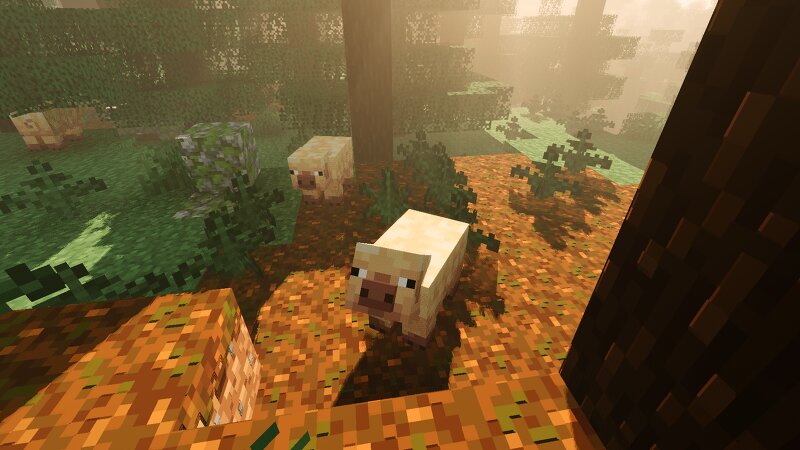
Creator notes
Where the sky becomes part of the world. Aerial is a shader pack focused on atmosphere, depth, and natural lighting. Instead of dramatically changing Minecraft's art style, it aims to make familiar landscapes feel larger, calmer, and more believable. Distant mountains fade naturally into the horizon, clouds gain real presence in the sky, and sunlight carries a softer sense of direction throughout the world. Whether you're exploring forests, building near the coast, or watching a storm roll across a plains biome, Aerial is designed to enhance the mood of the scene without overwhelming it. ✨ Highlights A living sky. The sky changes throughout the day with soft color transitions, atmospheric haze, and large cloud formations that feel connected to the world below. Sunrises are warm and subtle, while evenings gradually fade into deep blue nights filled with visible stars. Natural lighting. Sunlight feels softer and more grounded, helping terrain, vegetation, and structures stand out without excessive contrast. Bright areas remain vibrant while shadows retain detail instead of becoming completely black. Volumetric clouds. Clouds occupy physical space in the sky rather than appearing as
Added value
What’s included on this page
Preview, categories, compatibility, and tools on this page — not a bare file mirror.
- Creator
- xsoras
- Source
- Minecraft downloads library on Eaglercraft Studio
- Type
- Minecraft mod
- Price
- Free download on Eaglercraft Studio
- Curation
- Listed with credit to xsoras · studio preview & install guide
- Game Version
- Minecraft 26.2
- Compatible with
- Minecraft Java (match version / loader in facts)
- Tags
- Aesthetic, Ambient, Atmospheric, Autoexposure, Cinematic, Customizable
Install guide
How to install this free Minecraft mod
Eaglercraft Studio listing with metadata, creator credit, and loader-aware install guidance.
- 1Download the jar/zip when available.
- 2Install the matching loader (Forge, Fabric, or NeoForge) for your Minecraft version.
- 3Drop the mod into your mods folder, then launch with that profile.
Wrong loader or game version usually crashes on startup — read the facts on this page first.
Related free mods
More curated mods from the same library section.

Pastelmooncrafting15 · 67 diamonds · 20 views

PotatoWolfie · 60 diamonds · 2 views

PotatoWolfie · 53 diamonds · 622 views

Janss_33PL · 47 diamonds · 940 views