
Animal Garden - Crocodile
Creator: Aquarius_playz · 2026-02-18 · Mods · Free on Eaglercraft Studio
Download Animal Garden - Crocodile — free Minecraft mod. Created by Aquarius_playz. Tagged new content. Check the file details for Forge, Fabric, or NeoForge before installing.
Creator notes
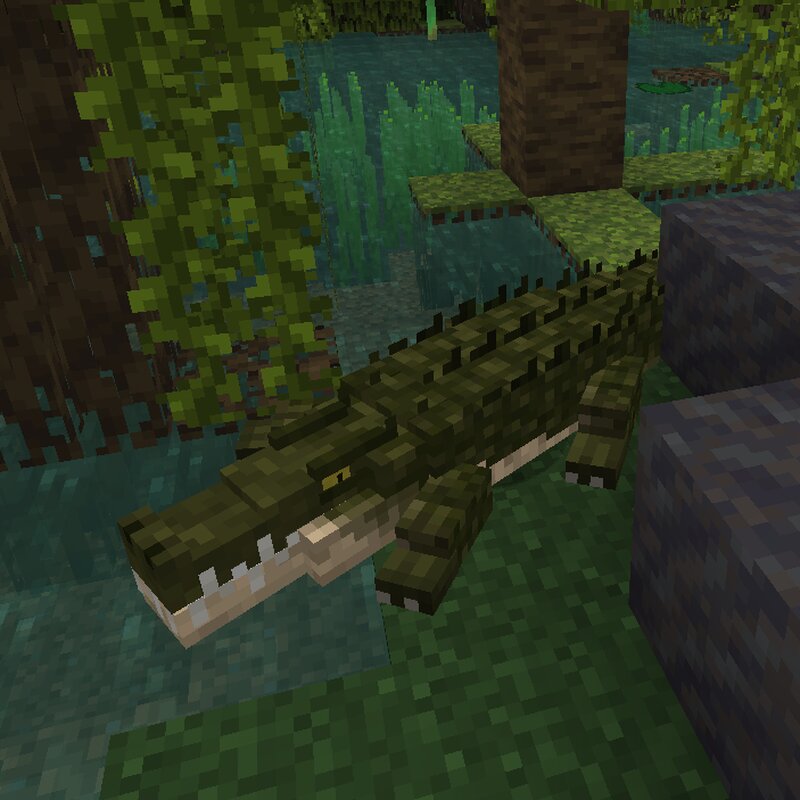
This mod adds crocodiles to your world to make the swamp a bit more dangerous place. (You can change this and other spawn settings by editing the json files in the data -> biome tags and biome modifier folders or via resource pack, but in fabric some spawn settings like the weight, min, max mob number have to be edited in the config file) When a creature comes near to them then after a while, they will feel threatened and might attack. (They show this by opening their mouth for some second) You cant tame them, but you can breed them with meat and fish items (custom item tag json file added for this so you can change it) They have a behavior where they randomly decide if they want to be on land or in water and they have 9 color variants. When on land they will sometimes lay down to rest a bit. And if a crocodile is damaged and there is a nearby food item on the ground that it can consume, then it will eat it to restore some of its lost health, also feeding, resting or staying in water will restore its health a little bit too. (from version 1.1.0) If they are in the water for a long time (10-20 minutes) then they will get moss/algae on their back until you clean them. You can scrub t
Added value
What’s included on this page
Preview, categories, compatibility, and tools on this page — not a bare file mirror.
- Creator
- Aquarius_playz
- Source
- Minecraft downloads library on Eaglercraft Studio
- Type
- Minecraft mod
- Price
- Free download on Eaglercraft Studio
- Curation
- Listed with credit to Aquarius_playz · studio preview & install guide
- Game Version
- Minecraft 26.1.1
- Compatible with
- Minecraft Java (match version / loader in facts)
- Tags
- New Content
Install guide
How to install this free Minecraft mod
Eaglercraft Studio listing with metadata, creator credit, and loader-aware install guidance.
- 1Download the jar/zip when available.
- 2Install the matching loader (Forge, Fabric, or NeoForge) for your Minecraft version.
- 3Drop the mod into your mods folder, then launch with that profile.
Wrong loader or game version usually crashes on startup — read the facts on this page first.
Related free mods
More curated mods from the same library section.

Pastelmooncrafting15 · 67 diamonds · 20 views

PotatoWolfie · 60 diamonds · 2 views

PotatoWolfie · 53 diamonds · 622 views

Janss_33PL · 47 diamonds · 940 views