
Animal Garden - Narwhal
Creator: Aquarius_playz · 2026-03-30 · Mods · Free on Eaglercraft Studio
Download Animal Garden - Narwhal — free Minecraft mod. Created by Aquarius_playz. Tagged new content. Check the file details for Forge, Fabric, or NeoForge before installing.
Creator notes
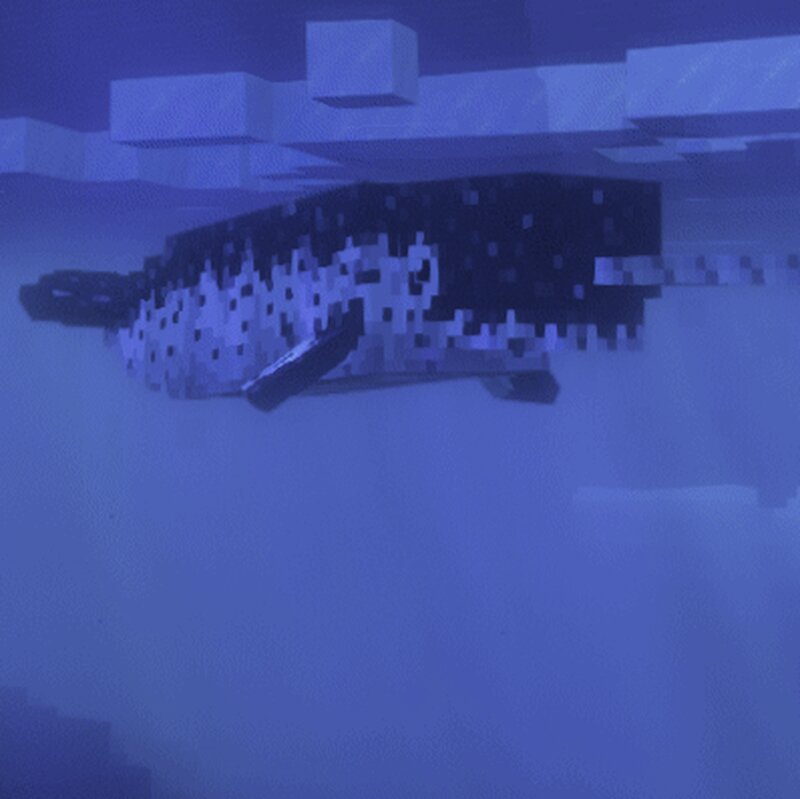
This mod adds the unicorns of the sea, the narwhals to the frozen ocean biomes. They are considered piscivores (fish-eaters), so they need fish items for taming and breeding . Also they heal a bit after every 30 second when in the water, eating fish items in the water by sucking them into their mouth or when fed by hand. To get the food they hunt fishes sometimes , tamed ones only hunt if their health is not max. And babies are always dark colored. Just like in my other animal mods the mobs have 3 type of behavior that can be changed when interaction with them (a message shows up so you know which behavior it is using) (wandering - resting - following) When tamed and in following mode they will fight alongside their owner, but they wont teleport to their owner when far away. And they can spawn with a tusk in different sizes. When they are attacked there is a 1% chance that they drop a part of their tusk that can be crafted into 5 bone meal. If their tusk is fully removed then they wont drop any tusk part anymore. Also when their owner is being targeted by a nearby creature then they will let out a loud sound to warn about the danger. As mentioned they spawn in the frozen ocean biom
Added value
What’s included on this page
Preview, categories, compatibility, and tools on this page — not a bare file mirror.
- Creator
- Aquarius_playz
- Source
- Minecraft downloads library on Eaglercraft Studio
- Type
- Minecraft mod
- Price
- Free download on Eaglercraft Studio
- Curation
- Listed with credit to Aquarius_playz · studio preview & install guide
- Game Version
- Minecraft 26.1.1
- Compatible with
- Minecraft Java (match version / loader in facts)
- Tags
- New Content
Install guide
How to install this free Minecraft mod
Eaglercraft Studio listing with metadata, creator credit, and loader-aware install guidance.
- 1Download the jar/zip when available.
- 2Install the matching loader (Forge, Fabric, or NeoForge) for your Minecraft version.
- 3Drop the mod into your mods folder, then launch with that profile.
Wrong loader or game version usually crashes on startup — read the facts on this page first.
Related free mods
More curated mods from the same library section.

Pastelmooncrafting15 · 67 diamonds · 20 views

PotatoWolfie · 60 diamonds · 2 views

PotatoWolfie · 53 diamonds · 622 views

Janss_33PL · 47 diamonds · 940 views