
Animal Garden - Springhare
Creator: Aquarius_playz · 2026-02-19 · Mods · Free on Eaglercraft Studio
Download Animal Garden - Springhare — free Minecraft mod. Created by Aquarius_playz. Tagged new content. Check the file details for Forge, Fabric, or NeoForge before installing.
Creator notes
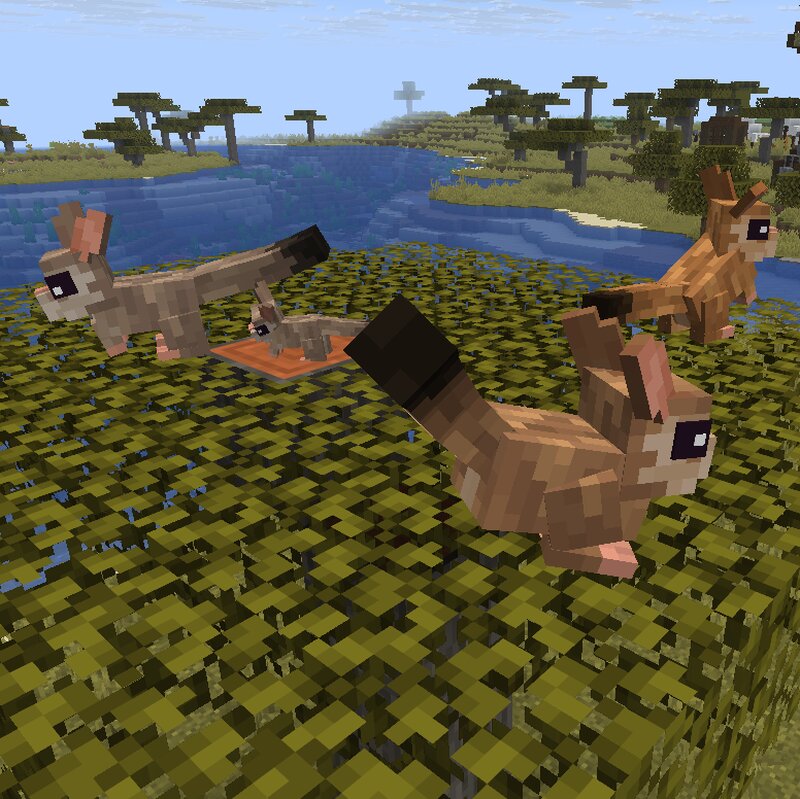
This mod adds another useful tamable critter to the savanna biomes, the Springhare! They are herbivorous, so they need plant based items for taming. Eats grass type block sometimes for faster growth and heal and can jump really high. The edible block list can be changed with the edible_blocks.json file in the tags/block(s) folder, just like how the tamable food items list can be changed with the food_items.json file in the tags/item(s) folder. They are nocturnal! So they sleep during the day and are active at night. (untamed only) And their special behavior is Digging -around every 5-10 minutes they dig up an item (80% chance) -item list can be changed with the random_item.json file in the tags/item(s) folder and Block Searching (tamed ones can smell out a block of interest even from underground in a small distance) -when the owner is near, they will let out a loud squeak to alert the owner that there is a rare block nearby, such as emerald, diamond, nether quartz or amethyst. -can be used once every 30 second (number can be changed in the config) -block list can be changed with the search_block.json file in the tags/block(s) folder As mentioned they spawn in the savanna biomes You
Added value
What’s included on this page
Preview, categories, compatibility, and tools on this page — not a bare file mirror.
- Creator
- Aquarius_playz
- Source
- Minecraft downloads library on Eaglercraft Studio
- Type
- Minecraft mod
- Price
- Free download on Eaglercraft Studio
- Curation
- Listed with credit to Aquarius_playz · studio preview & install guide
- Game Version
- Minecraft 26.1.1
- Compatible with
- Minecraft Java (match version / loader in facts)
- Tags
- New Content
Install guide
How to install this free Minecraft mod
Eaglercraft Studio listing with metadata, creator credit, and loader-aware install guidance.
- 1Download the jar/zip when available.
- 2Install the matching loader (Forge, Fabric, or NeoForge) for your Minecraft version.
- 3Drop the mod into your mods folder, then launch with that profile.
Wrong loader or game version usually crashes on startup — read the facts on this page first.
Related free mods
More curated mods from the same library section.

Pastelmooncrafting15 · 67 diamonds · 20 views

PotatoWolfie · 60 diamonds · 2 views

PotatoWolfie · 53 diamonds · 622 views

Janss_33PL · 47 diamonds · 940 views