
Animal Garden - Vicuña
Creator: Aquarius_playz · 2026-03-30 · Mods · Free on Eaglercraft Studio
Download Animal Garden - Vicuña — free Minecraft mod. Created by Aquarius_playz. Tagged new content. Check the file details for Forge, Fabric, or NeoForge before installing.
Creator notes
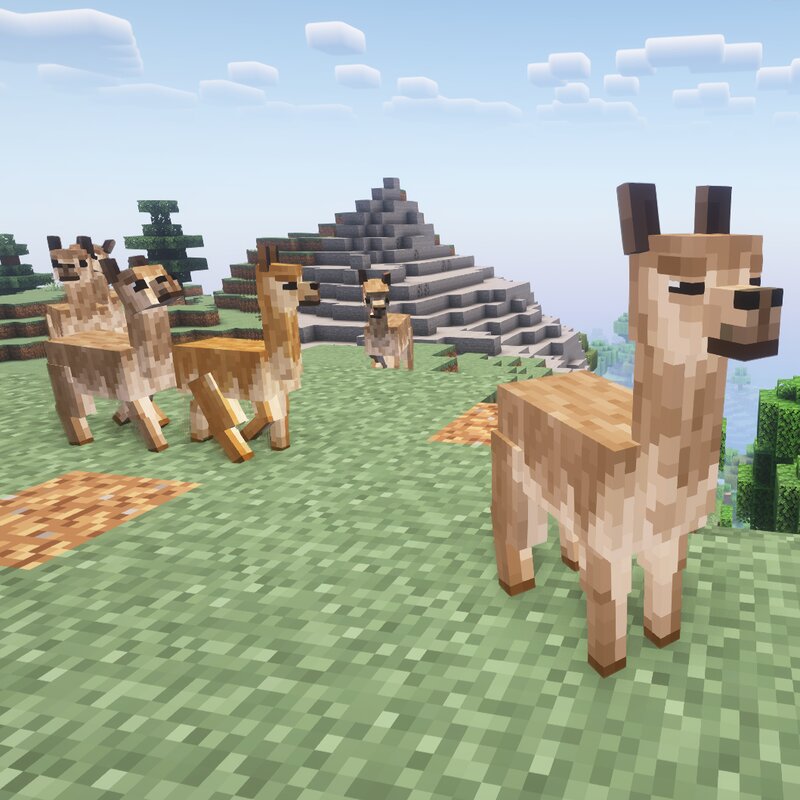
This mod adds the relatives of the llama, the vicuña as shearable animal into the game. They are herbivores (plant-eaters), so they need grass or wheat items for taming and breeding and are diurnal , meaning that they are active during daylight hours and rest or sleep at night. Also it can be sheared and after eating grass from the ground it can restore its wool (like the sheep, and dispenser works on them) There is a 50% chance that it drops yellow, orange and white wool and 100% chance for brown wool when sheared . And there is a 20% chance a leader (male) will spawn that is slighty larger and the others(smaller ones) will follow it. They are very timid and shy animals and will run away when another creature is near to them. Just like in my other animal mods the mobs have 3 type of behavior that can be changed when interaction with them (a message shows up so you know which behavior it is using) ( wandering - resting - following ) So you can make them stay at a place when put in resting mode. They live on higher-altitude places like windswept biomes or stony peaks. You can change this and other spawn settings by editing the json files in the data -> biome tags and biome modifier
Added value
What’s included on this page
Preview, categories, compatibility, and tools on this page — not a bare file mirror.
- Creator
- Aquarius_playz
- Source
- Minecraft downloads library on Eaglercraft Studio
- Type
- Minecraft mod
- Price
- Free download on Eaglercraft Studio
- Curation
- Listed with credit to Aquarius_playz · studio preview & install guide
- Game Version
- Minecraft 26.1.1
- Compatible with
- Minecraft Java (match version / loader in facts)
- Tags
- New Content
Install guide
How to install this free Minecraft mod
Eaglercraft Studio listing with metadata, creator credit, and loader-aware install guidance.
- 1Download the jar/zip when available.
- 2Install the matching loader (Forge, Fabric, or NeoForge) for your Minecraft version.
- 3Drop the mod into your mods folder, then launch with that profile.
Wrong loader or game version usually crashes on startup — read the facts on this page first.
Related free mods
More curated mods from the same library section.

Pastelmooncrafting15 · 67 diamonds · 20 views

PotatoWolfie · 60 diamonds · 2 views

PotatoWolfie · 53 diamonds · 622 views

Janss_33PL · 47 diamonds · 940 views