
Animal Garden - Western Gorilla
Creator: Aquarius_playz · 2025-12-02 · Mods · Free on Eaglercraft Studio
Download Animal Garden - Western Gorilla — free Minecraft mod. Created by Aquarius_playz. Tagged animal, fabric, forge, mob. Check the file details for Forge, Fabric, or NeoForge before installing.
Creator notes
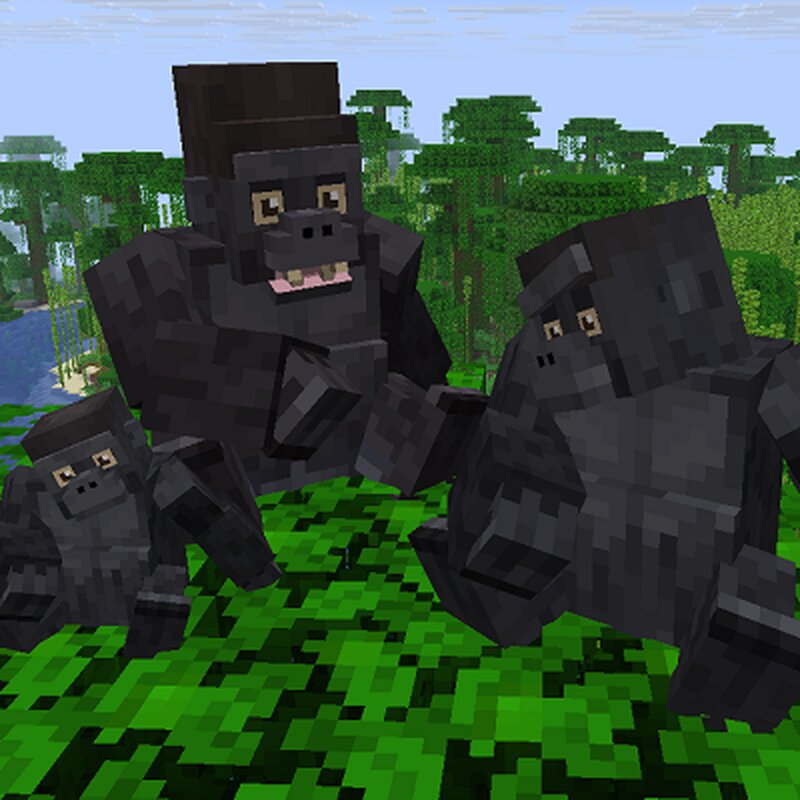
This mod adds the Western Gorilla as a mob to your world. You can find them in the jungle or bamboo jungle biome by default. edit spawn settings (In forge you can change this and other spawn settings by editing the json files in the data -> biome tags and biome modifier folders or via resource pack and in fabric there is a config file for it) You can tame them with any food item, but they wont follow you. So its more like a friendship. Like that they wont attack you and they will only protect you from your enemies when you are near to them. Because they are territorial animals, untamed male silverbacks will fight each other sometimes and they will also run up to other mobs or players if they see them as a threat and will target them. If you dont move for a while or use sneak while walking near to it, then it will leave you alone, except if you are already targeted. When there is an item near to it on the ground, it will pick it up and if the gorilla is not in combat and is damaged then it will eat it. If it does not find any item after 5-10 minute, then a random item will appear in its hand. The random item is choosen from the random_item.json and can be edited in the item tags.(if
Added value
What’s included on this page
Preview, categories, compatibility, and tools on this page — not a bare file mirror.
- Creator
- Aquarius_playz
- Source
- Minecraft downloads library on Eaglercraft Studio
- Type
- Minecraft mod
- Price
- Free download on Eaglercraft Studio
- Curation
- Listed with credit to Aquarius_playz · studio preview & install guide
- Game Version
- Minecraft 26.1.1
- Compatible with
- Minecraft Java (match version / loader in facts)
- Tags
- Animal, Fabric, Forge, Mob, More, Neoforge
Install guide
How to install this free Minecraft mod
Eaglercraft Studio listing with metadata, creator credit, and loader-aware install guidance.
- 1Download the jar/zip when available.
- 2Install the matching loader (Forge, Fabric, or NeoForge) for your Minecraft version.
- 3Drop the mod into your mods folder, then launch with that profile.
Wrong loader or game version usually crashes on startup — read the facts on this page first.
Related free mods
More curated mods from the same library section.

Pastelmooncrafting15 · 67 diamonds · 20 views

PotatoWolfie · 60 diamonds · 2 views

PotatoWolfie · 53 diamonds · 622 views

Janss_33PL · 47 diamonds · 940 views