
Apeiron - 2.85+ BILLION UNIQUE BLOCKS IN 16.7+ MILLION COLORS
Creator: wiglaf · 2026-03-01 · Mods · Free on Eaglercraft Studio
Download Apeiron - 2.85+ BILLION UNIQUE BLOCKS IN 16.7+ MILLION COLORS — free Minecraft mod. Created by wiglaf. Tagged aesthetic, blocks, resources. Check the file details for Forge, Fabric, or NeoForge before installing.
Creator notes
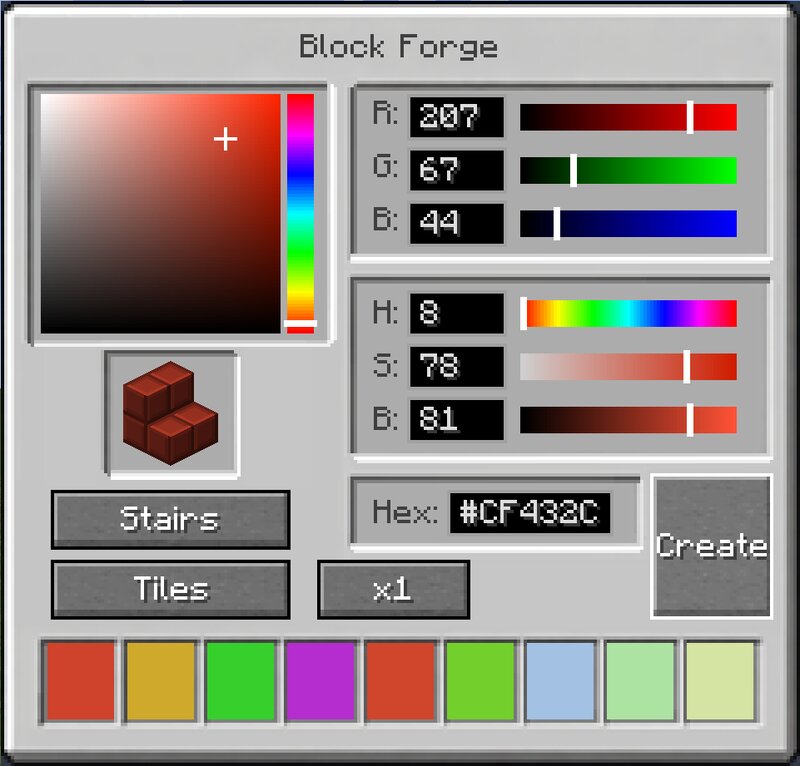
Apeiron — Paint Your World Ever wanted to build in exactly the right shade of teal? Or a soft warm beige that no vanilla block comes close to? Apeiron lets you place blocks in any RGB color you can imagine — all 16 million of them. Using the Color Wand , you can open a full color picker with an HSB wheel, RGB sliders, hex input, and a color history — then place your color onto any Apeiron block. The color is stored directly in the block, so it persists through world saves, chunk reloads, and multiplayer. 24 block types, each with multiple textures Each block type comes in multiple pattern variants — smooth, bricks, cracked bricks, planks, cobblestone, and more — giving you over 2.85 billion possible block combinations . That's not an exaggeration. That's 16 million colors × 24 types × multiple textures, and every single one is placeable in survival with crafting recipes. Whether you're building a cozy cottage, a modern megastructure, or anything in between — Apeiron gives you the palette to do it right. Supported versions: 1.21.1, 1.21.3, 1.21.4, 1.21.5, 1.21.8, 1.21.10, 1.21.11 Mod loader: Fabric LATER VERSIONS AVAILABLE ON CURSEFORGE AND MODRINTH. Curseforge: https://www.cursefor
Added value
What’s included on this page
Preview, categories, compatibility, and tools on this page — not a bare file mirror.
- Creator
- wiglaf
- Source
- Minecraft downloads library on Eaglercraft Studio
- Type
- Minecraft mod
- Price
- Free download on Eaglercraft Studio
- Curation
- Listed with credit to wiglaf · studio preview & install guide
- Game Version
- Minecraft 1.21.1
- Compatible with
- Minecraft Java (match version / loader in facts)
- Tags
- Aesthetic, Blocks, Resources
Install guide
How to install this free Minecraft mod
Eaglercraft Studio listing with metadata, creator credit, and loader-aware install guidance.
- 1Download the jar/zip when available.
- 2Install the matching loader (Forge, Fabric, or NeoForge) for your Minecraft version.
- 3Drop the mod into your mods folder, then launch with that profile.
Wrong loader or game version usually crashes on startup — read the facts on this page first.
Related free mods
More curated mods from the same library section.

Pastelmooncrafting15 · 67 diamonds · 20 views

PotatoWolfie · 60 diamonds · 2 views

PotatoWolfie · 53 diamonds · 622 views

Janss_33PL · 47 diamonds · 940 views