
Armor Durability Warning
Creator: Cyaawn · 2026-06-24 · Mods · Free on Eaglercraft Studio
Download Armor Durability Warning — free Minecraft mod. Created by Cyaawn. Tagged armor, armordurabilityfix, armorwarn, client. Check the file details for Forge, Fabric, or NeoForge before installing.
Creator notes
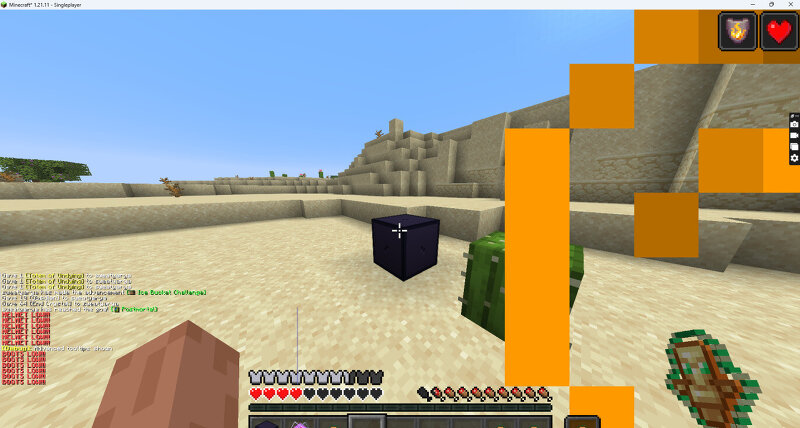
⭐ Get the latest versions here: ➡ Modrinth: modrinth.com/mod/armor-durability-warning Armor HUD Mod Overview Armor HUD is a Minecraft Fabric mod that provides a simple and effective way to monitor your equipped armor durability without opening the inventory. It displays important armor information directly on the screen, allowing players to quickly check the condition of their gear while playing. Features Displays durability information for equipped armor pieces. Provides a customizable HUD for better visibility. Allows players to set durability warning thresholds. Sends notifications when armor durability becomes low. Works smoothly without affecting normal gameplay. Advantages Better Awareness: Players can always see their armor condition during gameplay. Prevents Unexpected Breaks: Alerts help avoid losing protection because of broken armor. Saves Time: Removes the need to repeatedly open the inventory to check durability. Useful in Combat: Helps players prepare repairs or replacements during PvP and dangerous situations. Customizable Experience: Players can adjust settings based on their preferences. Use Cases Armor HUD is useful for survival players, PvP players, explorers, an
Added value
What’s included on this page
Preview, categories, compatibility, and tools on this page — not a bare file mirror.
- Creator
- Cyaawn
- Source
- Minecraft downloads library on Eaglercraft Studio
- Type
- Minecraft mod
- Price
- Free download on Eaglercraft Studio
- Curation
- Listed with credit to Cyaawn · studio preview & install guide
- Game Version
- Minecraft 1.21.11
- Compatible with
- Minecraft Java (match version / loader in facts)
- Tags
- Armor, Armordurabilityfix, Armorwarn, Client, Config, Configui
Install guide
How to install this free Minecraft mod
Eaglercraft Studio listing with metadata, creator credit, and loader-aware install guidance.
- 1Download the jar/zip when available.
- 2Install the matching loader (Forge, Fabric, or NeoForge) for your Minecraft version.
- 3Drop the mod into your mods folder, then launch with that profile.
Wrong loader or game version usually crashes on startup — read the facts on this page first.
Related free mods
More curated mods from the same library section.

Pastelmooncrafting15 · 67 diamonds · 20 views

PotatoWolfie · 60 diamonds · 2 views

PotatoWolfie · 53 diamonds · 622 views

Janss_33PL · 47 diamonds · 940 views