
ArmorPlus 55+ | 20 Unique Armor Sets | Beautiful Textures | Bedrock
Creator: Sergey7363635 · 2026-09-06 · Mods · Free on Eaglercraft Studio
Download ArmorPlus 55+ | 20 Unique Armor Sets | Beautiful Textures | Bedrock — free Minecraft mod. Created by Sergey7363635. Tagged armor, bedrock, mod, new content. Check the file details for Forge, Fabric, or NeoForge before installing.
Creator notes
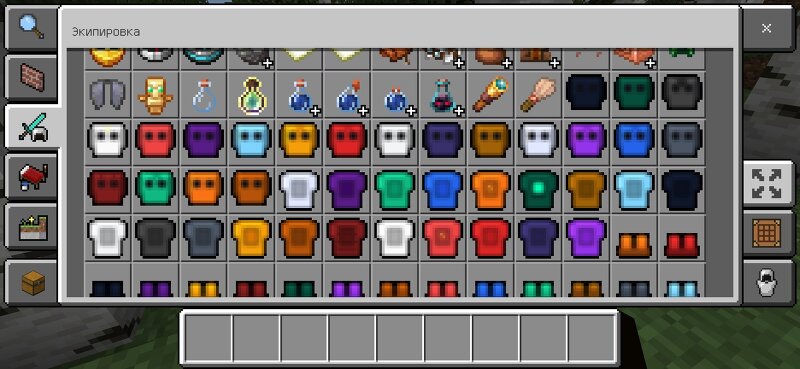
ArmorPlus 55+ — Beautiful Custom Armor Addon for Minecraft Bedrock Tired of the same old diamond and netherite armor? ArmorPlus 55+ adds 20 unique and stylish armor sets with carefully crafted textures and balanced stats. Every set has its own visual style:• Gem armors (Emerald, Ruby, Sapphire, Amethyst, Topaz)• Metal armors (Steel, Bronze, Copper, Obsidian)• Fantasy sets (Dragon, Ender, Warden, Phoenix)• Elemental sets (Fire, Ice)• Legendary sets (Netherite+, Celestial, Void, Eternal) Features:• 20 full armor sets (80 pieces total)• Unique detailed textures for every material• Different protection and durability values• Custom Russian & English names• Craftable recipes• Trimmable armor support• Clean pack icon Armor list:Emerald, Ruby, Sapphire, Amethyst, Topaz, Obsidian, Quartz, Copper, Bronze, Steel, Dragon, Ender, Warden, Fire, Ice, Phoenix, Netherite+, Celestial, Void, Eternal How to install:1. Download the .mcaddon file2. Open it with Minecraft3. Create a new world or edit an existing one4. Enable both Behavior Pack and Resource Pack "ArmorPlus 55+"5. Enjoy your new armor! Works on:• Minecraft Bedrock 1.21+• Windows, Android, iOS, Xbox, PlayStation, Switch Created with love.F
Added value
What’s included on this page
Preview, categories, compatibility, and tools on this page — not a bare file mirror.
- Creator
- Sergey7363635
- Source
- Minecraft downloads library on Eaglercraft Studio
- Type
- Minecraft mod
- Price
- Free download on Eaglercraft Studio
- Curation
- Listed with credit to Sergey7363635 · studio preview & install guide
- Game Version
- Minecraft 26.3 snapshot
- Compatible with
- Minecraft Java (match version / loader in facts)
- Tags
- Armor, Bedrock, Mod, New Content
Install guide
How to install this free Minecraft mod
Eaglercraft Studio listing with metadata, creator credit, and loader-aware install guidance.
- 1Download the jar/zip when available.
- 2Install the matching loader (Forge, Fabric, or NeoForge) for your Minecraft version.
- 3Drop the mod into your mods folder, then launch with that profile.
Wrong loader or game version usually crashes on startup — read the facts on this page first.
Related free mods
More curated mods from the same library section.

Pastelmooncrafting15 · 67 diamonds · 20 views

PotatoWolfie · 60 diamonds · 2 views

PotatoWolfie · 53 diamonds · 622 views

Janss_33PL · 47 diamonds · 940 views