
AuthCore
Creator: ded3ec · 2026-01-04 · Mods · Free on Eaglercraft Studio
Download AuthCore — free Minecraft mod. Created by ded3ec. Tagged authenticator, fabric, loginsecurity, server. Check the file details for Forge, Fabric, or NeoForge before installing.
Creator notes
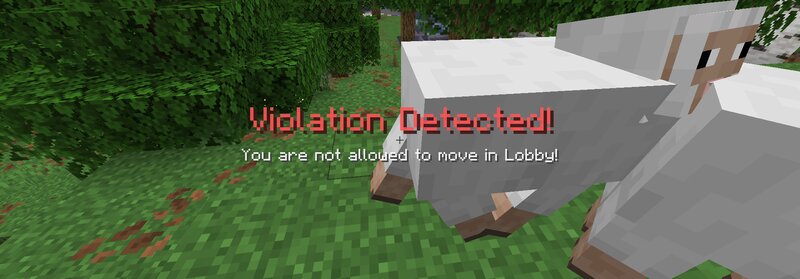
🔐 AuthCore The Fortress Framework for Fabric Servers. AuthCore is a high-performance, server-side login framework designed for large-scale Fabric 1.21+ environments . While other mods just check a password, AuthCore manages the entire lifecycle of a player's session—securing the server against bot attacks, griefing attempts during login, and session hijacking. Ideal for: Massive SMPs, Public Community Servers, and Hybrid Networks demanding 20 TPS. 🏢 Enterprise-Grade Features Designed for server owners who need absolute control. Here is how AuthCore’s configuration translates to real-world server benefits. ⚙️ Configuration / Features 🚀 Benefits for Minecraft Server Hermetic Limbo State (Blocks: Breaking, Placing, Item Use, Drops, Movement, Chat, Commands) Zero-Grief Lobby. Unauthenticated players are effectively ghosts. They cannot spam chat, ruin spawn, steal items, or generate chunk updates that lag the server. Granular Entity Protection (Separately blocks attacks on: Players, Hostiles, Animals, Pets, Villagers) Spawn Integrity. Prevents malicious users from logging in just to kill the community pet or trade-lock villagers before they even authenticate. Smart Session Management (I
Added value
What’s included on this page
Preview, categories, compatibility, and tools on this page — not a bare file mirror.
- Creator
- ded3ec
- Source
- Minecraft downloads library on Eaglercraft Studio
- Type
- Minecraft mod
- Price
- Free download on Eaglercraft Studio
- Curation
- Listed with credit to ded3ec · studio preview & install guide
- Game Version
- Minecraft 1.21.11
- Compatible with
- Minecraft Java (match version / loader in facts)
- Tags
- Authenticator, Fabric, Loginsecurity, Server
Install guide
How to install this free Minecraft mod
Eaglercraft Studio listing with metadata, creator credit, and loader-aware install guidance.
- 1Download the jar/zip when available.
- 2Install the matching loader (Forge, Fabric, or NeoForge) for your Minecraft version.
- 3Drop the mod into your mods folder, then launch with that profile.
Wrong loader or game version usually crashes on startup — read the facts on this page first.
Related free mods
More curated mods from the same library section.

Pastelmooncrafting15 · 67 diamonds · 20 views

PotatoWolfie · 60 diamonds · 2 views

PotatoWolfie · 53 diamonds · 622 views

Janss_33PL · 47 diamonds · 940 views