
Auto Login
Creator: lyuwenhan · 2026-04-03 · Mods · Free on Eaglercraft Studio
Download Auto Login — free Minecraft mod. Created by lyuwenhan. Tagged functional, login, utility. Check the file details for Forge, Fabric, or NeoForge before installing.
Creator notes
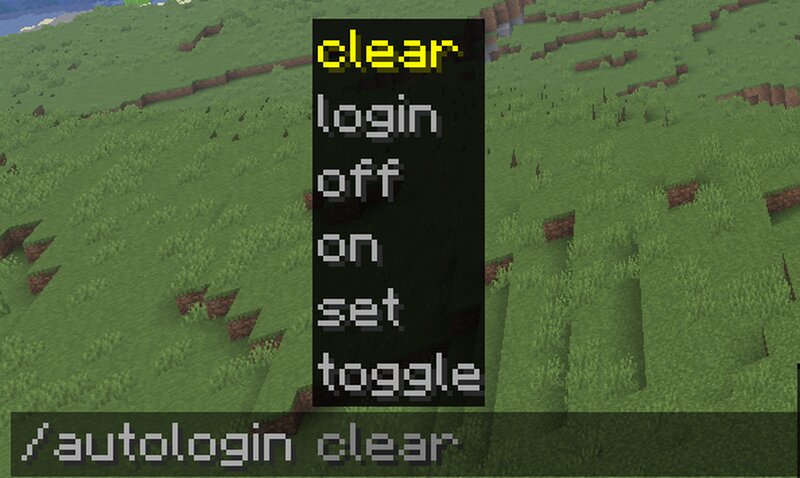
Languages EN/English | ZH-CN/简体中文 Auto Login A client-side Fabric mod that automatically logs you into authentication-based Minecraft servers (e.g. EasyAuth, AuthMe) using a locally encrypted password. This mod runs entirely on the client and does not modify any server behavior. Features Automatically sends /login <password> after joining a server Password is stored locally and encrypted (AES-GCM with random device key) No server-side plugin or mod required Client-only and suitable for multiplayer servers Manual command trigger for testing or fallback use Commands Set password (required once) /autologin set <password> Encrypts and saves the password locally Enables auto-login automatically Trigger auto-login immediately /autologin login Runs a login attempt immediately Useful for testing or manual retries Enable / disable /autologin on /autologin off Clear saved password /autologin clear Deletes stored credentials Disables auto-login How It Works On first setup, the password is encrypted and saved locally When you join a server: The mod waits until the client is fully initialized Then sends the login command directly to the server The password is never sent anywhere else and is nev
Added value
What’s included on this page
Preview, categories, compatibility, and tools on this page — not a bare file mirror.
- Creator
- lyuwenhan
- Source
- Minecraft downloads library on Eaglercraft Studio
- Type
- Minecraft mod
- Price
- Free download on Eaglercraft Studio
- Curation
- Listed with credit to lyuwenhan · studio preview & install guide
- Game Version
- Minecraft 26.3 snapshot
- Compatible with
- Minecraft Java (match version / loader in facts)
- Tags
- Functional, Login, Utility
Install guide
How to install this free Minecraft mod
Eaglercraft Studio listing with metadata, creator credit, and loader-aware install guidance.
- 1Download the jar/zip when available.
- 2Install the matching loader (Forge, Fabric, or NeoForge) for your Minecraft version.
- 3Drop the mod into your mods folder, then launch with that profile.
Wrong loader or game version usually crashes on startup — read the facts on this page first.
Related free mods
More curated mods from the same library section.

Pastelmooncrafting15 · 67 diamonds · 20 views

PotatoWolfie · 60 diamonds · 2 views

PotatoWolfie · 53 diamonds · 622 views

Janss_33PL · 47 diamonds · 940 views