
AutoBuild, Automated Schematic Builder
Creator: oDilan · 2026-02-08 · Mods · Free on Eaglercraft Studio
Download AutoBuild, Automated Schematic Builder — free Minecraft mod. Created by oDilan. Tagged autobuild, autobuildmod, automation, builder. Check the file details for Forge, Fabric, or NeoForge before installing.
Creator notes
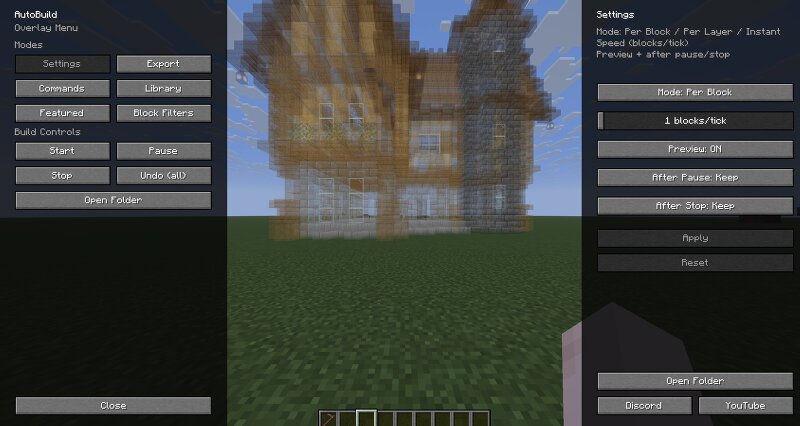
AutoBuild AutoBuild is a Fabric mod that lets you load schematics, preview them in-game, and build them automatically block by block in your world. It is made for survival builders, creative builders, multiplayer servers, and content creators who want faster building without losing control over placement, rotation, preview, and materials. Preview Features Load and build `.schem` structures in-game Real-time ghost preview before building Move, rotate, and flip the preview with in-game tools Per-block or per-layer building modes Adjustable build speed Undo support for recent placed blocks Material overview and missing block checks Creative-only missing materials command In-game settings menu Folder-based schematic library Featured Library for browsing highlighted schematics Works in both Survival and Creative Multiplayer friendly with per-player build states and settings Commands /autobuild load <file> - Load a schematic /autobuild list - List available schematics /autobuild start - Start building the loaded schematic /autobuild stop - Stop the current build /autobuild preview <on|off> - Toggle preview rendering /autobuild speed <value> - Change build speed /autobuild undo <steps|all
Added value
What’s included on this page
Preview, categories, compatibility, and tools on this page — not a bare file mirror.
- Creator
- oDilan
- Source
- Minecraft downloads library on Eaglercraft Studio
- Type
- Minecraft mod
- Price
- Free download on Eaglercraft Studio
- Curation
- Listed with credit to oDilan · studio preview & install guide
- Game Version
- Minecraft 1.21.11
- Compatible with
- Minecraft Java (match version / loader in facts)
- Tags
- Autobuild, Autobuildmod, Automation, Builder, Building, Construction
Install guide
How to install this free Minecraft mod
Eaglercraft Studio listing with metadata, creator credit, and loader-aware install guidance.
- 1Download the jar/zip when available.
- 2Install the matching loader (Forge, Fabric, or NeoForge) for your Minecraft version.
- 3Drop the mod into your mods folder, then launch with that profile.
Wrong loader or game version usually crashes on startup — read the facts on this page first.
Related free mods
More curated mods from the same library section.

Pastelmooncrafting15 · 67 diamonds · 20 views

PotatoWolfie · 60 diamonds · 2 views

PotatoWolfie · 53 diamonds · 622 views

Janss_33PL · 47 diamonds · 940 views