
Baby Spiders (+ Baby Spiders (Extra) ) Bedrock 1.21+
Creator: NotMnthr · 2026-03-26 · Mods · Free on Eaglercraft Studio
Download Baby Spiders (+ Baby Spiders (Extra) ) Bedrock 1.21+ — free Minecraft mod. Created by NotMnthr. Tagged aesthetic, bedrock, extra, other. Check the file details for Forge, Fabric, or NeoForge before installing.
Creator notes
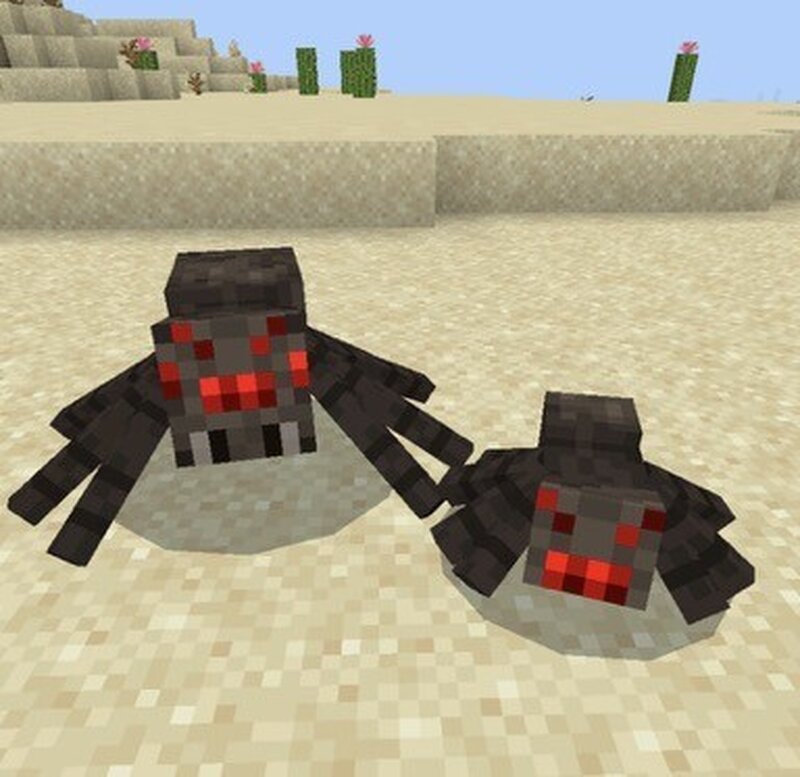
(! this mod doesn’t add much content, it’s more of an aesthetic mod!) — Baby Spiders 1.2.2 — Adds a Baby Variant of the Spider (picture no.2) They spawn more often, but deal less damage Added only one mob so it can keep the vanilla feel — Baby Spiders (Extra) 1.1.0 — Adds 3 More Variants (Each with Special Abilities) Adds 1 Item Mobs Added: - Poisonous Baby Spider (picture no.3) (A mini cave spider) Gives Poison for 5 Seconds per Hit Spawns Naturally } - Teleporting Baby Spider (picture no.5) Has the Ability to Teleport Deals 3 Hearts of Damage Spawns Naturally } - Passive Baby Spider (picture no.4) Leash-able Wont Attack you Nameable Drops the Silk Heart Spawns Naturally (Still gets attacked by iron golems) Items Added: - Silk Heart (A Memory Item) (obtained from the passive baby spider) Has Glint ——— Use the “Alternative Link” to Download the Extra, and The file for the Original will be in this mod listing My Discord Server: discord.gg/Jx4wWFaMdB
Added value
What’s included on this page
Preview, categories, compatibility, and tools on this page — not a bare file mirror.
- Creator
- NotMnthr
- Source
- Minecraft downloads library on Eaglercraft Studio
- Type
- Minecraft mod
- Price
- Free download on Eaglercraft Studio
- Curation
- Listed with credit to NotMnthr · studio preview & install guide
- Game Version
- Minecraft 26.1
- Compatible with
- Minecraft Java (match version / loader in facts)
- Tags
- Aesthetic, Bedrock, Extra, Other, Spider
Install guide
How to install this free Minecraft mod
Eaglercraft Studio listing with metadata, creator credit, and loader-aware install guidance.
- 1Download the jar/zip when available.
- 2Install the matching loader (Forge, Fabric, or NeoForge) for your Minecraft version.
- 3Drop the mod into your mods folder, then launch with that profile.
Wrong loader or game version usually crashes on startup — read the facts on this page first.
Related free mods
More curated mods from the same library section.

Pastelmooncrafting15 · 67 diamonds · 20 views

PotatoWolfie · 60 diamonds · 2 views

PotatoWolfie · 53 diamonds · 622 views

Janss_33PL · 47 diamonds · 940 views