
Backlight - Borealis Free
Creator: SEAMPROOF · 2026-08-25 · Mods · Free on Eaglercraft Studio
Download Backlight - Borealis Free — free Minecraft mod. Created by SEAMPROOF. Tagged cosmetic, free, new content, wings. Check the file details for Forge, Fabric, or NeoForge before installing.
Creator notes
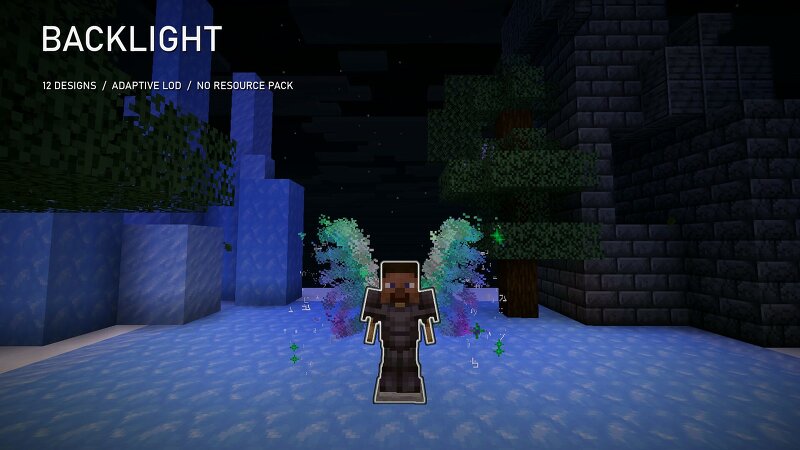
BOREALIS, FREE AND COMPLETE Borealis is one of the twelve animated particle sculptures in Backlight. This download gives you that design as a permanent, standalone Paper plugin. It is not a timer, a cut-down animation, or a video pretending to be a demo: install it, equip it, and keep using it on servers you operate. WHAT YOU GET Backlight Lite 1.0.0 with the complete Borealis wing design, editable render settings, a plain-English setup guide, a free-product licence, SHA-256 checksums, and the compatibility certificate from the exact release test. Borealis draws a 150-point hero frame with a measured 4.20 x 2.02 block silhouette, 58 sampled colours, two particle behaviours, bilateral geometry, animated depth, and a protected channel around the player's torso. Distance-based frames reduce rendering work for faraway viewers, while the per-viewer frame cap samples across the whole sculpture instead of chopping off one wing. MEASURED ON PAPER 1.21.8 The shipped JAR was tested on Paper 1.21.8-60 with Java 21. A native 1.21.8 client opened the menu, equipped Borealis, and received 1,420 particle packets. Equipped state survived a reconnect and a complete server restart. Permission denial
Added value
What’s included on this page
Preview, categories, compatibility, and tools on this page — not a bare file mirror.
- Creator
- SEAMPROOF
- Source
- Minecraft downloads library on Eaglercraft Studio
- Type
- Minecraft mod
- Price
- Free download on Eaglercraft Studio
- Curation
- Listed with credit to SEAMPROOF · studio preview & install guide
- Game Version
- Minecraft 26.3 snapshot
- Compatible with
- Minecraft Java (match version / loader in facts)
- Tags
- Cosmetic, Free, New Content, Wings
Install guide
How to install this free Minecraft mod
Eaglercraft Studio listing with metadata, creator credit, and loader-aware install guidance.
- 1Download the jar/zip when available.
- 2Install the matching loader (Forge, Fabric, or NeoForge) for your Minecraft version.
- 3Drop the mod into your mods folder, then launch with that profile.
Wrong loader or game version usually crashes on startup — read the facts on this page first.
Related free mods
More curated mods from the same library section.

Pastelmooncrafting15 · 67 diamonds · 20 views

PotatoWolfie · 60 diamonds · 2 views

PotatoWolfie · 53 diamonds · 622 views

Janss_33PL · 47 diamonds · 940 views