
Bank Card Mod
Creator: Shadow_Ua · 2026-03-30 · Mods · Free on Eaglercraft Studio
Download Bank Card Mod — free Minecraft mod. Created by Shadow_Ua. Tagged bank, card, economy, other. Check the file details for Forge, Fabric, or NeoForge before installing.
Creator notes
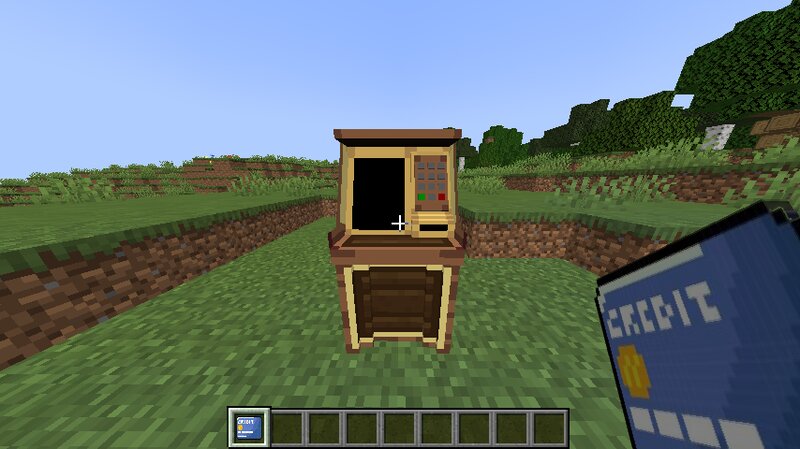
🏦 Bank Card Mod A modern and immersive banking system for Minecraft 1.20.1 that lets players turn physical currency into digital money — all stored on real in-game bank cards. ✨ Features 🏧 3D ATM Terminal Custom-made block (modeled in Blockbench) that acts as a full banking interface. Clean, simple, and immersive. 💳 Physical Bank Cards Your balance is stored directly on the card using NBT data. 👉 Trade it, store it, or risk losing it — just like real life. ⚙️ Flexible Currency System Fully configurable via .toml file. Supports: Diamonds (default) Modded currencies (like coins) Any custom item 💻 Simple Commands Easy-to-use commands: /bank deposit /bank withdraw Work directly with the card you're holding. 💾 Persistent Storage All data is saved on the card item itself. ✔ No database needed ✔ Safe across server restarts ⚙️ Technical Info Minecraft Version: 1.20.1 Loader: Forge Type: Universal (Client + Server required) Config File: config/bankcard-common.toml 💡 Why use this mod? Adds real economy vibes to your server Perfect for RP, survival economy, factions Makes trading more interesting and risky
Added value
What’s included on this page
Preview, categories, compatibility, and tools on this page — not a bare file mirror.
- Creator
- Shadow_Ua
- Source
- Minecraft downloads library on Eaglercraft Studio
- Type
- Minecraft mod
- Price
- Free download on Eaglercraft Studio
- Curation
- Listed with credit to Shadow_Ua · studio preview & install guide
- Game Version
- Minecraft 1.20.1
- Compatible with
- Minecraft Java (match version / loader in facts)
- Tags
- Bank, Card, Economy, Other, Terminal
Install guide
How to install this free Minecraft mod
Eaglercraft Studio listing with metadata, creator credit, and loader-aware install guidance.
- 1Download the jar/zip when available.
- 2Install the matching loader (Forge, Fabric, or NeoForge) for your Minecraft version.
- 3Drop the mod into your mods folder, then launch with that profile.
Wrong loader or game version usually crashes on startup — read the facts on this page first.
Related free mods
More curated mods from the same library section.

Pastelmooncrafting15 · 67 diamonds · 20 views

PotatoWolfie · 60 diamonds · 2 views

PotatoWolfie · 53 diamonds · 622 views

Janss_33PL · 47 diamonds · 940 views