
(BEDROCK) Hold To Enchant — Auto enchant add-on
Creator: BeraGG · 2026-05-05 · Mods · Free on Eaglercraft Studio
Download (BEDROCK) Hold To Enchant — Auto enchant add-on — free Minecraft mod. Created by BeraGG. Tagged bedrock, enchantment, functional, holdtoenchant. Check the file details for Forge, Fabric, or NeoForge before installing.
Creator notes
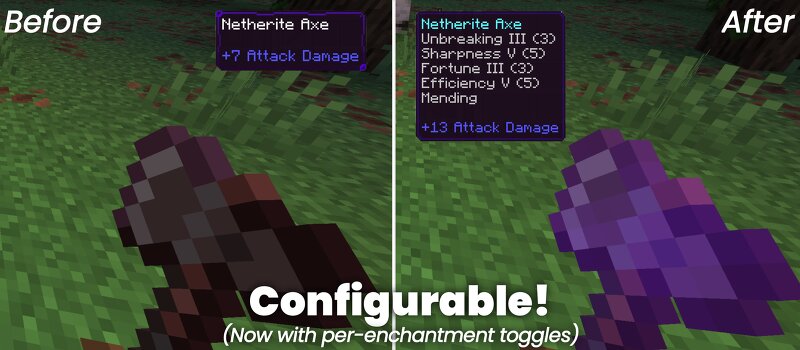
Hold to Enchant is a script-based utility that immediately enchants the item you're holding to the max level. Simply hold an item, and the add-on handles the rest. It operates entirely via @minecraft/server Scripting API, mapping your held items to specific enchantment sets. --- This add-on works without disabling achievement. MAIN FEATURES Instant Enchanting — Automatically applies relevant enchants the moment you hold an item. Swords get Sharpness V, Looting III, Fire Aspect II, and Unbreaking III. Picks get Fortune III or Silk Touch. And so on. Conflicting Enchantments — Use the configuration menu to choose between conflicting enchants like Silk Touch vs Fortune, Mending vs Infinity, or Depth Strider vs Frost Walker — no guesswork needed. (NewBows add-on from SystemTv) Universal Compatibility — Works for all vanilla tools, weapons, and armor, plus custom items from other add-ons. Perfect combo with my other add-on: Fortune Extender — Duplicate any block you mine with Fortune enchantment! --- TECHNICAL DEEP-DIVEThe engine runs on a 10-tick interval to balance responsiveness with server performance. - It scans both EquipmentSlot.Mainhand and EquipmentSlot.Offhand against a lookup
Added value
What’s included on this page
Preview, categories, compatibility, and tools on this page — not a bare file mirror.
- Creator
- BeraGG
- Source
- Minecraft downloads library on Eaglercraft Studio
- Type
- Minecraft mod
- Price
- Free download on Eaglercraft Studio
- Curation
- Listed with credit to BeraGG · studio preview & install guide
- Game Version
- Minecraft 26.1.1
- Compatible with
- Minecraft Java (match version / loader in facts)
- Tags
- Bedrock, Enchantment, Functional, Holdtoenchant, Hte, Survival
Install guide
How to install this free Minecraft mod
Eaglercraft Studio listing with metadata, creator credit, and loader-aware install guidance.
- 1Download the jar/zip when available.
- 2Install the matching loader (Forge, Fabric, or NeoForge) for your Minecraft version.
- 3Drop the mod into your mods folder, then launch with that profile.
Wrong loader or game version usually crashes on startup — read the facts on this page first.
Related free mods
More curated mods from the same library section.

Pastelmooncrafting15 · 67 diamonds · 20 views

PotatoWolfie · 60 diamonds · 2 views

PotatoWolfie · 53 diamonds · 622 views

Janss_33PL · 47 diamonds · 940 views