
Best Armor
Creator: lyuwenhan · 2026-07-20 · Mods · Free on Eaglercraft Studio
Download Best Armor — free Minecraft mod. Created by lyuwenhan. Tagged functional. Check the file details for Forge, Fabric, or NeoForge before installing.
Creator notes
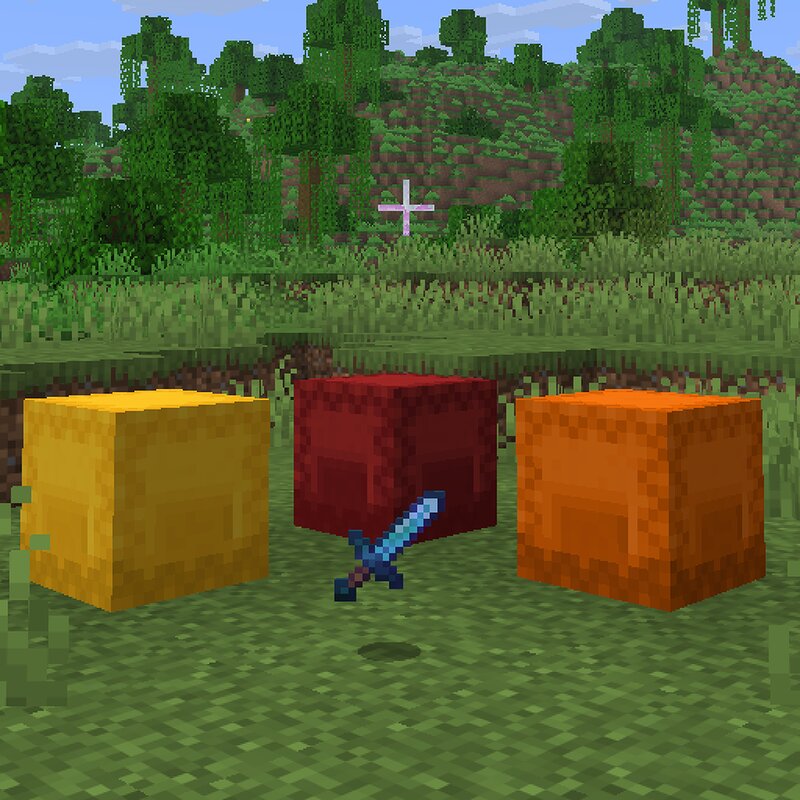
Languages EN/English | ZH-CN/简体中文 Best Armor A client-side Fabric mod that adds three prebuilt equipment shulker boxes and a Void Sword to the operator creative tab. Overview Best Armor adds the following dynamically generated items to the operator-only creative tab: Yellow Shulker Box Orange Shulker Box Red Shulker Box Void Sword Items inside each shulker box are listed in their actual slot order. Every enchantment, component, and attribute is written directly under the relevant item. Added Creative Items Yellow Shulker Box The Yellow Shulker Box contains 27 items based on high-end enchantments obtainable in normal Survival gameplay. Netherite Sword — Sharpness V, Sweeping Edge III, Looting III, Unbreaking III, Mending Fortune Netherite Axe — Sharpness V, Fortune III, Efficiency V, Unbreaking III, Mending Fortune Netherite Pickaxe — Fortune III, Efficiency V, Unbreaking III, Mending Fortune Netherite Shovel — Fortune III, Efficiency V, Unbreaking III, Mending Fortune Netherite Hoe — Fortune III, Efficiency V, Unbreaking III, Mending Bow — Power V, Unbreaking III, Infinity Loyalty Trident — Impaling V, Loyalty III, Unbreaking III, Mending Riptide Trident — Impaling V, Riptide III,
Added value
What’s included on this page
Preview, categories, compatibility, and tools on this page — not a bare file mirror.
- Creator
- lyuwenhan
- Source
- Minecraft downloads library on Eaglercraft Studio
- Type
- Minecraft mod
- Price
- Free download on Eaglercraft Studio
- Curation
- Listed with credit to lyuwenhan · studio preview & install guide
- Game Version
- Minecraft 26.3 snapshot
- Compatible with
- Minecraft Java (match version / loader in facts)
- Tags
- Functional
Install guide
How to install this free Minecraft mod
Eaglercraft Studio listing with metadata, creator credit, and loader-aware install guidance.
- 1Download the jar/zip when available.
- 2Install the matching loader (Forge, Fabric, or NeoForge) for your Minecraft version.
- 3Drop the mod into your mods folder, then launch with that profile.
Wrong loader or game version usually crashes on startup — read the facts on this page first.
Related free mods
More curated mods from the same library section.

Pastelmooncrafting15 · 67 diamonds · 20 views

PotatoWolfie · 60 diamonds · 2 views

PotatoWolfie · 53 diamonds · 622 views

Janss_33PL · 47 diamonds · 940 views