
Better Step
Creator: lyuwenhan · 2026-07-19 · Mods · Free on Eaglercraft Studio
Download Better Step — free Minecraft mod. Created by lyuwenhan. Tagged functional. Check the file details for Forge, Fabric, or NeoForge before installing.
Creator notes
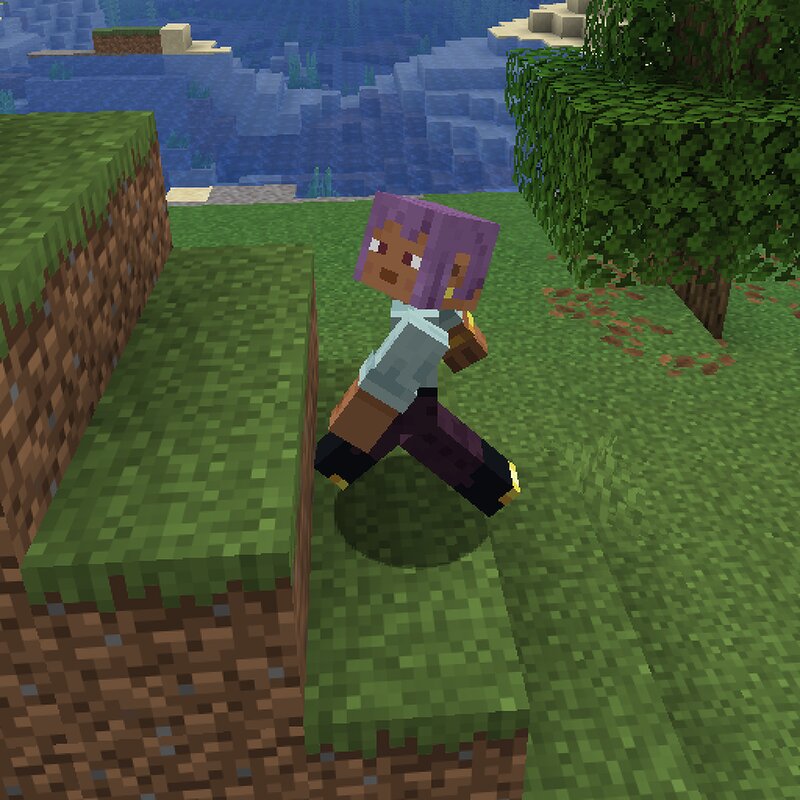
Languages EN/English | ZH-CN/简体中文 Better Step A client-side Fabric mod that improves player stepping behavior when moving across uneven terrain. Features Allows smoother step-up movement Adds controlled step-down behavior for small drops Prevents unsafe automatic step-down in survival-like modes Treats creative mode as always safe for step-down Does not trigger air step-up while the player is creative-flying Works on dedicated servers and in single-player worlds Behavior The mod improves movement across block-height changes by adding custom step-up and step-down handling. Step-up behavior: Allows players to step up even when they are not fully grounded Helps reduce movement blocking when colliding with small ledges or uneven terrain Does not trigger while the player is flying Only applies to player movement Step-down behavior: If the player moves forward without hitting an obstacle, the mod checks whether there is a reachable lower surface within step height If a valid lower surface is found, the player steps down smoothly If no reachable surface is found, the mod does not force the player downward In non-creative modes, step-down height is limited by the player's safe fall distanc
Added value
What’s included on this page
Preview, categories, compatibility, and tools on this page — not a bare file mirror.
- Creator
- lyuwenhan
- Source
- Minecraft downloads library on Eaglercraft Studio
- Type
- Minecraft mod
- Price
- Free download on Eaglercraft Studio
- Curation
- Listed with credit to lyuwenhan · studio preview & install guide
- Game Version
- Minecraft 26.3 snapshot
- Compatible with
- Minecraft Java (match version / loader in facts)
- Tags
- Functional
Install guide
How to install this free Minecraft mod
Eaglercraft Studio listing with metadata, creator credit, and loader-aware install guidance.
- 1Download the jar/zip when available.
- 2Install the matching loader (Forge, Fabric, or NeoForge) for your Minecraft version.
- 3Drop the mod into your mods folder, then launch with that profile.
Wrong loader or game version usually crashes on startup — read the facts on this page first.
Related free mods
More curated mods from the same library section.

Pastelmooncrafting15 · 67 diamonds · 20 views

PotatoWolfie · 60 diamonds · 2 views

PotatoWolfie · 53 diamonds · 622 views

Janss_33PL · 47 diamonds · 940 views