
BetterParticles 👑 | Smooth Head Auras & RGB Effects (1.21 server plugin)
Creator: RoccCraft · 2026-03-26 · Mods · Free on Eaglercraft Studio
Download BetterParticles 👑 | Smooth Head Auras & RGB Effects (1.21 server plug — free Minecraft mod. Created by RoccCraft. Tagged other. Check the file details for Forge, Fabric, or NeoForge before installing.
Creator notes
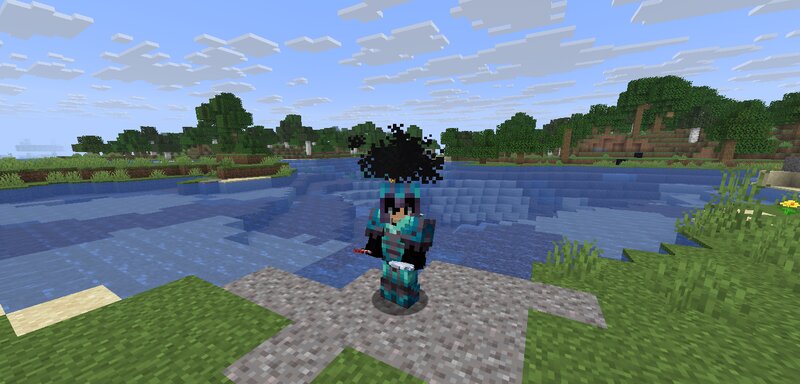
Do private message for help donation ✨ BetterParticles ✨ A lightweight and clean particle plugin that adds smooth, non-laggy effects above the player’s head. 💎 Features: • Clean aura-style particles (no messy explosions) • RGB glow 👑 • Dark "Black Aura" 💀 • Wings 🪽 • Halo 👑 • Spiral 🌀 • Flame, Heart, Portal & Magic effects 🔥❤️ • Smooth animations above head (no screen blocking) • Optimized & lightweight 🎮 Commands: /particle flame → 🔥 Flame aura above head /particle heart → ❤️ Heart aura /particle portal → 🌀 Portal-style aura /particle magic → ✨ Magic glow aura /particle aura → 🔥 Anime-style dual aura /particle wings → 🪽 Particle wings /particle rgb → 👑 RGB glowing crown /particle black → 💀 Dark aura (black glow) /particle halo → 👑 Halo ring above head /particle spiral → 🌀 Small spiral aura /particle off → ❌ Disable particles ✨ Available Effects: flame, heart, portal, magic, aura, wings, rgb, black, halo, spiral ⚡ Why BetterParticles? Unlike other plugins, particles are: ✔ Clean & controlled ✔ Positioned above the player ✔ Smoothly animated ✔ No lag or spam 🛠️ Version: ✔ Minecraft 1.21 💡 Perfect for: • Survival servers • SMPs • Cosmetic systems • VIP features 📸 Add screenshots to s
Added value
What’s included on this page
Preview, categories, compatibility, and tools on this page — not a bare file mirror.
- Creator
- RoccCraft
- Source
- Minecraft downloads library on Eaglercraft Studio
- Type
- Minecraft mod
- Price
- Free download on Eaglercraft Studio
- Curation
- Listed with credit to RoccCraft · studio preview & install guide
- Game Version
- Minecraft 1.21.11
- Compatible with
- Minecraft Java (match version / loader in facts)
- Tags
- Other
Install guide
How to install this free Minecraft mod
Eaglercraft Studio listing with metadata, creator credit, and loader-aware install guidance.
- 1Download the jar/zip when available.
- 2Install the matching loader (Forge, Fabric, or NeoForge) for your Minecraft version.
- 3Drop the mod into your mods folder, then launch with that profile.
Wrong loader or game version usually crashes on startup — read the facts on this page first.
Related free mods
More curated mods from the same library section.

Pastelmooncrafting15 · 67 diamonds · 20 views

PotatoWolfie · 60 diamonds · 2 views

PotatoWolfie · 53 diamonds · 622 views

Janss_33PL · 47 diamonds · 940 views