
Block To XP Converter
Creator: Flappyguy · 2026-01-10 · Mods · Free on Eaglercraft Studio
Download Block To XP Converter — free Minecraft mod. Created by Flappyguy. Tagged other. Check the file details for Forge, Fabric, or NeoForge before installing.
Creator notes
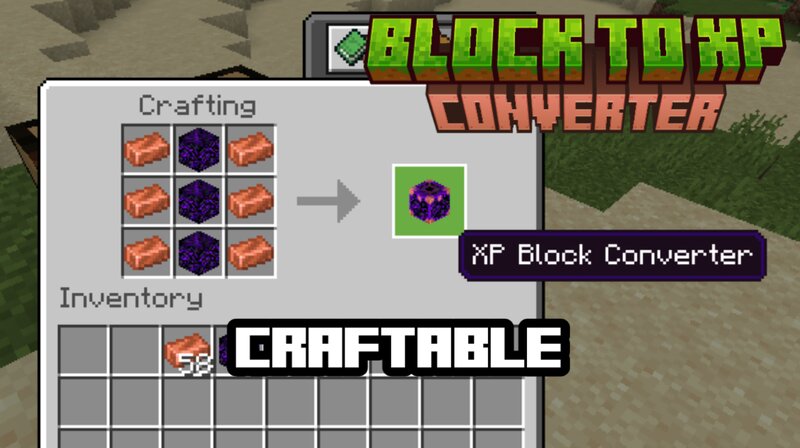
Block To XP Converter:You can craft the Converter using "3 CRYING OBSIDIANS AND 6 COPPER INGOTS" To Access the block, you must have a block in your hand. This block wouldn't work if you press the Converter Block with nothing in your hand. XP Rewards:You will get XP based on how the valuable a block is, there are tiers on this Add-on on how many XPs can you get (This is it for now but it will get updated soon): TIER 1: LEGENDARY (100+ XP)Netherite Block: 150 XPDiamond Block: 100 XPEmerald Block: 80 XP TIER 2: RARE (30–80 XP)Gold Block: 50 XPIron Block: 30 XPLapis Block: 25 XPDiamond Ore: 40 XP TIER 3: UNCOMMON (10–30 XP)Redstone Block: 20 XPCoal Block: 15 XPGold Ore: 15 XPIron Ore: 10 XP TIER 4: COMMON (3–10 XP)Copper Ore: 8 XPStone, Dirt, Wood: 3–5 XPAll Other Blocks: 3 XP Works With Modded Blocks:This add-on also works with modded blocks, these are the amount of XPs that you can get from it: Blocks with "crystal" or "gem" name: 25 XPBlocks with "ore" name: 12 XPAll other blocks: 3 XP Choose What To Convert:You can choose what block or item you want to convert in here, you can also choose the amount of blocks and items that you want to convert. CONVERT ALL:There's also an option he
Added value
What’s included on this page
Preview, categories, compatibility, and tools on this page — not a bare file mirror.
- Creator
- Flappyguy
- Source
- Minecraft downloads library on Eaglercraft Studio
- Type
- Minecraft mod
- Price
- Free download on Eaglercraft Studio
- Curation
- Listed with credit to Flappyguy · studio preview & install guide
- Game Version
- Minecraft 1.21.11
- Compatible with
- Minecraft Java (match version / loader in facts)
- Tags
- Other
Install guide
How to install this free Minecraft mod
Eaglercraft Studio listing with metadata, creator credit, and loader-aware install guidance.
- 1Download the jar/zip when available.
- 2Install the matching loader (Forge, Fabric, or NeoForge) for your Minecraft version.
- 3Drop the mod into your mods folder, then launch with that profile.
Wrong loader or game version usually crashes on startup — read the facts on this page first.
Related free mods
More curated mods from the same library section.

Pastelmooncrafting15 · 67 diamonds · 20 views

PotatoWolfie · 60 diamonds · 2 views

PotatoWolfie · 53 diamonds · 622 views

Janss_33PL · 47 diamonds · 940 views