
Bricklands
Creator: DerexXD · 2026-09-28 · Mods · Free on Eaglercraft Studio
Download Bricklands — free Minecraft mod. Created by DerexXD. Tagged bricklands, bricks, derexxd, hexlands. Check the file details for Forge, Fabric, or NeoForge before installing.
Creator notes
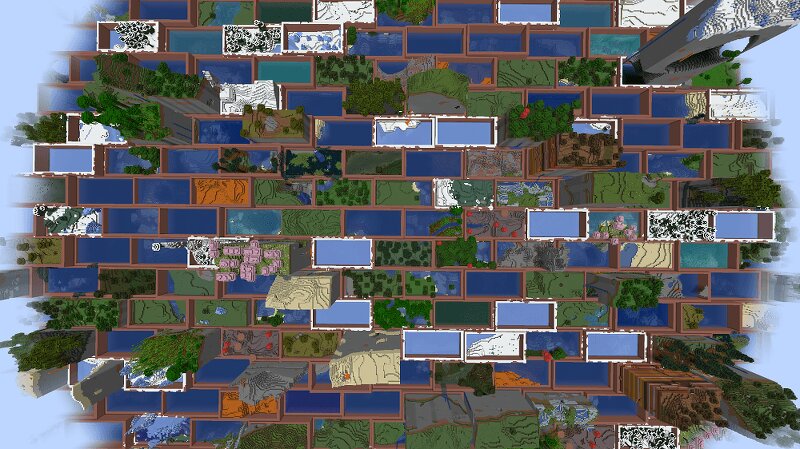
Description This mod is based on HexLands by AlcatrazEscapee (MIT), rewritten so biomes sit on a staggered brick grid instead of hexes. HexLands itself is based on the original Hex Lands (2019) by superfluke, anonlinux777, and TehNut. Features Adds two world type presets: "Bricklands", and "Bricklands (Overworld)". The former enables brick terrain generation in the overworld and the nether; the latter only enables it in the overworld. The world create Customize button edits brick size, rims, merge-same-biome, and random biomes. Each brick is 4 chunks wide by 2 chunks tall, with odd rows shifted by half a brick. Each brick contains a single biome. Bricks of different types are bordered by walls. Automatic compatibility with mods that add biomes to the overworld or other world generation. Many options for world customization via data packs. Configuration (Data Packs - 1.21) Worlds are specified by World Presets . Bricklands can be customized by adding a new world preset, which uses the bricklands:bricklands chunk generator. The generator has the following fields: type is a string identifying what generator to use. It should be bricklands:bricklands . The older bricklands:hexlands id
Added value
What’s included on this page
Preview, categories, compatibility, and tools on this page — not a bare file mirror.
- Creator
- DerexXD
- Source
- Minecraft downloads library on Eaglercraft Studio
- Type
- Minecraft mod
- Price
- Free download on Eaglercraft Studio
- Curation
- Listed with credit to DerexXD · studio preview & install guide
- Game Version
- Minecraft 26.3 snapshot
- Compatible with
- Minecraft Java (match version / loader in facts)
- Tags
- Bricklands, Bricks, Derexxd, Hexlands, Mod, Modded
Install guide
How to install this free Minecraft mod
Eaglercraft Studio listing with metadata, creator credit, and loader-aware install guidance.
- 1Download the jar/zip when available.
- 2Install the matching loader (Forge, Fabric, or NeoForge) for your Minecraft version.
- 3Drop the mod into your mods folder, then launch with that profile.
Wrong loader or game version usually crashes on startup — read the facts on this page first.
Related free mods
More curated mods from the same library section.

Pastelmooncrafting15 · 67 diamonds · 20 views

PotatoWolfie · 60 diamonds · 2 views

PotatoWolfie · 53 diamonds · 622 views

Janss_33PL · 47 diamonds · 940 views