
🧟 Buddy – Your Loyal Bodyguard (Fabric-Mod 1.21.11)
Creator: Heykikoo · 2026-03-24 · Mods · Free on Eaglercraft Studio
Download 🧟 Buddy – Your Loyal Bodyguard (Fabric-Mod 1.21.11) — free Minecraft mod. Created by Heykikoo. Tagged buddy, companion, fabric, functional. Check the file details for Forge, Fabric, or NeoForge before installing.
Creator notes
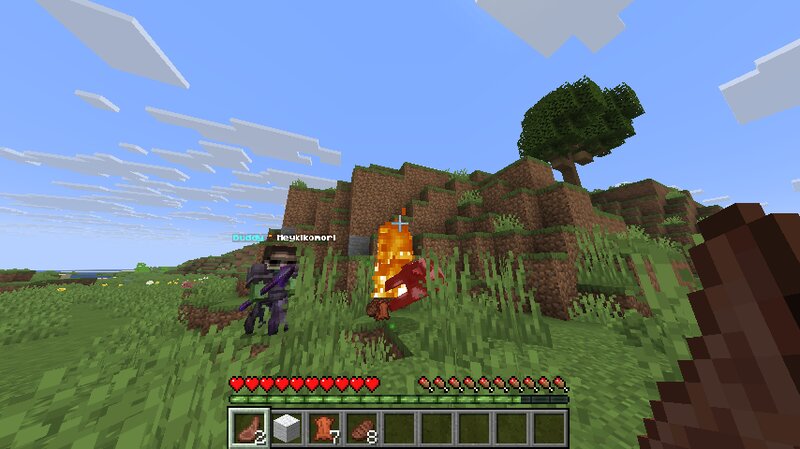
🧟 Buddy – Your Loyal Bodyguard 🔥 Fabric Companion Mod for Minecraft 1.21.11 Buddy is a Fabric companion mod for Minecraft 1.21.11 that gives you a loyal bodyguard with a player head, custom gear, and simple follow-and-protect behavior. ⚙️ Requirements Minecraft 1.21.11 Fabric Loader Fabric API 🧟 What Buddy Does Buddy spawns as your personal companion. He follows you through the world and teleports back to you if he gets too far away. Buddy fights hostile mobs that attack you or that you attack. He automatically respawns if he dies and always remains loyal to his owner. Buddy does not attack you and your hits against him are blocked so you cannot accidentally hurt him. 🎭 Visual Style Buddy wears a player head based on his owner. His name appears above him as Buddy * PlayerName ⚔️ Equipment Netherite Chestplate Netherite Leggings Netherite Boots Netherite Spear Buddy is designed to be strong enough to protect you in survival worlds and challenge runs. ⌨️ Commands /companion spawn /companion despawn /companion status 🎮 How It Works Use /companion spawn to summon Buddy. Once active, he stays assigned to you and follows you automatically. If Buddy dies, he respawns automatically. Use /c
Added value
What’s included on this page
Preview, categories, compatibility, and tools on this page — not a bare file mirror.
- Creator
- Heykikoo
- Source
- Minecraft downloads library on Eaglercraft Studio
- Type
- Minecraft mod
- Price
- Free download on Eaglercraft Studio
- Curation
- Listed with credit to Heykikoo · studio preview & install guide
- Game Version
- Minecraft 1.21.11
- Compatible with
- Minecraft Java (match version / loader in facts)
- Tags
- Buddy, Companion, Fabric, Functional, Funny, Mod
Install guide
How to install this free Minecraft mod
Eaglercraft Studio listing with metadata, creator credit, and loader-aware install guidance.
- 1Download the jar/zip when available.
- 2Install the matching loader (Forge, Fabric, or NeoForge) for your Minecraft version.
- 3Drop the mod into your mods folder, then launch with that profile.
Wrong loader or game version usually crashes on startup — read the facts on this page first.
Related free mods
More curated mods from the same library section.

Pastelmooncrafting15 · 67 diamonds · 20 views

PotatoWolfie · 60 diamonds · 2 views

PotatoWolfie · 53 diamonds · 622 views

Janss_33PL · 47 diamonds · 940 views