
BuilderPalette - The Easiest Way to Organize Blocks in Minecraft
Creator: oDilan · 2026-03-19 · Mods · Free on Eaglercraft Studio
Download BuilderPalette - The Easiest Way to Organize Blocks in Minecraft — free Minecraft mod. Created by oDilan. Tagged automation, builder, builderpalette, builderpalettemod. Check the file details for Forge, Fabric, or NeoForge before installing.
Creator notes
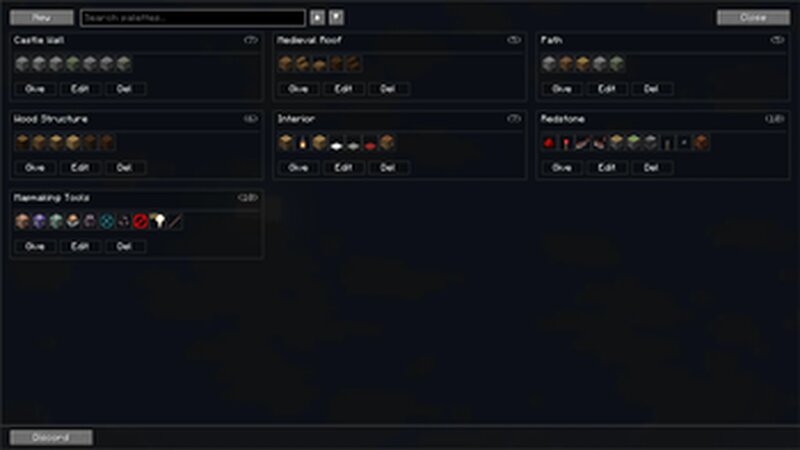
BuilderPalette BuilderPalette is a lightweight building utility that helps Minecraft builders quickly organize and access the blocks they use most. Instead of constantly searching through the creative inventory, you can create custom block palettes and keep all the blocks for your build in one place. Perfect for **large builds, medieval projects, terraforming, and detailed interiors.** Features • Create and manage **custom block palettes** • Quickly browse and add blocks using the **in-game block browser** • Instantly view all blocks used in a palette • Clean and simple **builder-focused interface** • Helps keep your **block styles consistent across builds** • Lightweight and easy to use How it works 1. Press P to open the BuilderPalette menu 2. Create a new palette 3. Add blocks using the block browser 4. Use the palette while building to quickly access your blocks No more scrolling through the entire creative inventory. Example Uses BuilderPalette can help you organize blocks for things like: • Roof block combinations • Path and road blocks • Wall and foundation blocks • Interior decoration blocks • Nature and landscaping blocks This helps keep your builds organized and visually
Added value
What’s included on this page
Preview, categories, compatibility, and tools on this page — not a bare file mirror.
- Creator
- oDilan
- Source
- Minecraft downloads library on Eaglercraft Studio
- Type
- Minecraft mod
- Price
- Free download on Eaglercraft Studio
- Curation
- Listed with credit to oDilan · studio preview & install guide
- Game Version
- Minecraft 1.21.11
- Compatible with
- Minecraft Java (match version / loader in facts)
- Tags
- Automation, Builder, Builderpalette, Builderpalettemod, Building, Construction
Install guide
How to install this free Minecraft mod
Eaglercraft Studio listing with metadata, creator credit, and loader-aware install guidance.
- 1Download the jar/zip when available.
- 2Install the matching loader (Forge, Fabric, or NeoForge) for your Minecraft version.
- 3Drop the mod into your mods folder, then launch with that profile.
Wrong loader or game version usually crashes on startup — read the facts on this page first.
Related free mods
More curated mods from the same library section.

Pastelmooncrafting15 · 67 diamonds · 20 views

PotatoWolfie · 60 diamonds · 2 views

PotatoWolfie · 53 diamonds · 622 views

Janss_33PL · 47 diamonds · 940 views