
Chest DNA | Minecraft Mod 1.7.10 - 26.2 |
Creator: xsoras · 2026-08-12 · Mods · Free on Eaglercraft Studio
Download Chest DNA | Minecraft Mod 1.7.10 - 26.2 | — free Minecraft mod. Created by xsoras. Tagged adventure, api, awesome, best. Check the file details for Forge, Fabric, or NeoForge before installing.
Creator notes
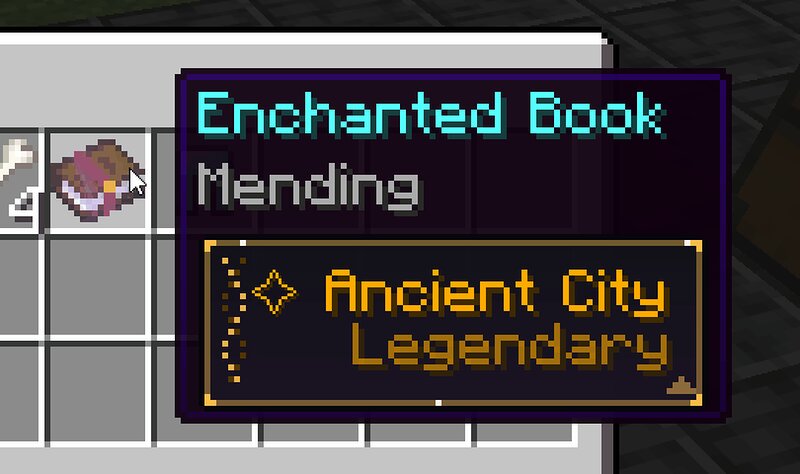
Chest DNA Records where every item came from and shows it in the item's tooltip. Open a chest and you get loot with no story. Chest DNA fixes that: the moment an item is created it gets an origin stamped onto it, and that stamp travels with the item for the rest of its life. What it does Whenever an item enters the world - looted from a chest, dropped by a mob, bought from a villager, fished up, crafted, smelted or mined - Chest DNA attaches an origin to it containing: Source - village, dungeon, End City, ancient city, mob, trade, workbench, … Detail - the loot table it rolled from, or the entity that dropped it Biome and dimension it came from Coordinates of the exact spot Structure it was found inside, when there is one Who obtained it, by name This is stored as a real data component, so it survives world saves, shulker boxes, ender chests and multiplayer - and it is readable by commands, datapacks and other mods. What it looks like Hovering the item draws a pixel-art card under the normal tooltip, drawn one pixel at a time with no textures, so it stays crisp at every GUI scale: source name on top, tier stamped underneath frame colour by rarity - grey for a village chest, gold
Added value
What’s included on this page
Preview, categories, compatibility, and tools on this page — not a bare file mirror.
- Creator
- xsoras
- Source
- Minecraft downloads library on Eaglercraft Studio
- Type
- Minecraft mod
- Price
- Free download on Eaglercraft Studio
- Curation
- Listed with credit to xsoras · studio preview & install guide
- Game Version
- Minecraft 26.2
- Compatible with
- Minecraft Java (match version / loader in facts)
- Tags
- Adventure, Api, Awesome, Best, Chest, Chests
Install guide
How to install this free Minecraft mod
Eaglercraft Studio listing with metadata, creator credit, and loader-aware install guidance.
- 1Download the jar/zip when available.
- 2Install the matching loader (Forge, Fabric, or NeoForge) for your Minecraft version.
- 3Drop the mod into your mods folder, then launch with that profile.
Wrong loader or game version usually crashes on startup — read the facts on this page first.
Related free mods
More curated mods from the same library section.

Pastelmooncrafting15 · 67 diamonds · 20 views

PotatoWolfie · 60 diamonds · 2 views

PotatoWolfie · 53 diamonds · 622 views

Janss_33PL · 47 diamonds · 940 views