
CoolGuy42443's Classes
Creator: CoolGuy42443 · 2026-01-11 · Mods · Free on Eaglercraft Studio
Download CoolGuy42443's Classes — free Minecraft mod. Created by CoolGuy42443. Tagged classes, new content. Check the file details for Forge, Fabric, or NeoForge before installing.
Creator notes
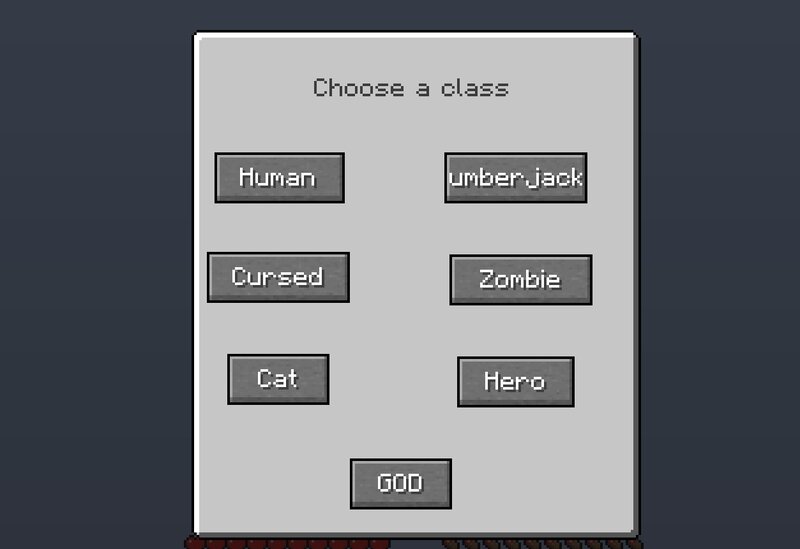
Classes Classes is a Minecraft 1.21.8 mod that adds different types of classes that players can choose from when joining a world/server. Every class has its benefits and debuffs all giving a different Minecraft experience. The mod currently has 7 classes but will improve and get more. Mod works on both singleplayer and multiplayer. Classes: Human: +Regular Minecraft experience Lumberjack: +Spawn in with a stone axe +Permanent Haste effect Cursed: +Get a full set of iron tools on spawn -Permanent Unluck and Bad omen effcets Zombie: +Permanent Strength effect -Permanent Hunger effect Cat: +Permanent Night vision effect +Permanent Speed and Jump boost effects -Shrink in size and lose 3 hearts Hero: +Permanent Hero of the village effect +Permanent Strength effect -Permanent Mining fatigue effect GOD: +++GOD has no weaknesses. He is absolute power. -There can only be one GOD every world/server. Warden: +Gain three times regular health -Gain permanent Slowness and Darkness -Slightly become bigger Fish: +Gain permanent Water breathing -Lose 3 hearts of health and become smaller Werewolf: +Gain Strength effect when it is night time -Gain Weakness effect when it is day time And many more cl
Added value
What’s included on this page
Preview, categories, compatibility, and tools on this page — not a bare file mirror.
- Creator
- CoolGuy42443
- Source
- Minecraft downloads library on Eaglercraft Studio
- Type
- Minecraft mod
- Price
- Free download on Eaglercraft Studio
- Curation
- Listed with credit to CoolGuy42443 · studio preview & install guide
- Game Version
- Minecraft 1.21.8
- Compatible with
- Minecraft Java (match version / loader in facts)
- Tags
- Classes, New Content
Install guide
How to install this free Minecraft mod
Eaglercraft Studio listing with metadata, creator credit, and loader-aware install guidance.
- 1Download the jar/zip when available.
- 2Install the matching loader (Forge, Fabric, or NeoForge) for your Minecraft version.
- 3Drop the mod into your mods folder, then launch with that profile.
Wrong loader or game version usually crashes on startup — read the facts on this page first.
Related free mods
More curated mods from the same library section.

Pastelmooncrafting15 · 67 diamonds · 20 views

PotatoWolfie · 60 diamonds · 2 views

PotatoWolfie · 53 diamonds · 622 views

Janss_33PL · 47 diamonds · 940 views