
Combat Zone
Creator: Tjopix · 2026-03-23 · Mods · Free on Eaglercraft Studio
Download Combat Zone — free Minecraft mod. Created by Tjopix. Tagged cod, deathmatch, easysetup, gungame. Check the file details for Forge, Fabric, or NeoForge before installing.
Creator notes
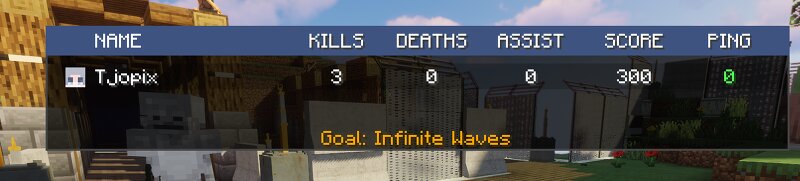
👻 Combat Zone - by Tjopix 😎 Shootergames in Minecraft - MOD SUPPORT!!! Combat Zone is a premium-style arena management mod for Minecraft Forge. It allows server admins to create, manage, and run automated combat matches (Deathmatch, Team Deathmatch, and GunGame) with ease. ⚠️ Important: This mod supports all kinds of mods! 🧱 Core Features: 📝 No server needed , just invite your friends to a single-player world! (install Essentials mod) 🎮 Multiple Game Modes: Choose between DM (Free for All), TDM (Red vs Blue.), and GunGame (Progressive weapons). 💎 Premium HUD : A modern, glass-morphism style top bar showing match status, timer, and personal kill counts. 💀 Universal Killcam : A cinematic "WASTED" overlay triggered on every death, including environmental hazards and NPCs. 📜 Sign-Based Interaction : Players can join matches, select kits, or leave the arena simply by right-clicking signs. 🛡️ Auto-Armor System : Kits automatically equip armor to the correct slots upon selection. 🚧 World Boundary Enforcement : Define map limits (pos1/pos2) to keep players within the battlefield. 🤖 Target Dummies : Spawn specialized NPCs to test your weapons and kill detection. 💾 Robust Data System : All m
Added value
What’s included on this page
Preview, categories, compatibility, and tools on this page — not a bare file mirror.
- Creator
- Tjopix
- Source
- Minecraft downloads library on Eaglercraft Studio
- Type
- Minecraft mod
- Price
- Free download on Eaglercraft Studio
- Curation
- Listed with credit to Tjopix · studio preview & install guide
- Game Version
- Minecraft 1.20.1
- Compatible with
- Minecraft Java (match version / loader in facts)
- Tags
- Cod, Deathmatch, Easysetup, Gungame, Mod, Modsupport
Install guide
How to install this free Minecraft mod
Eaglercraft Studio listing with metadata, creator credit, and loader-aware install guidance.
- 1Download the jar/zip when available.
- 2Install the matching loader (Forge, Fabric, or NeoForge) for your Minecraft version.
- 3Drop the mod into your mods folder, then launch with that profile.
Wrong loader or game version usually crashes on startup — read the facts on this page first.
Related free mods
More curated mods from the same library section.

Pastelmooncrafting15 · 67 diamonds · 20 views

PotatoWolfie · 60 diamonds · 2 views

PotatoWolfie · 53 diamonds · 622 views

Janss_33PL · 47 diamonds · 940 views