
CoreSwap — a C++ rewrite of Minecraft's worldgen
Creator: unknowbug · 2026-09-03 · Mods · Free on Eaglercraft Studio
Download CoreSwap — a C++ rewrite of Minecraft's worldgen — free Minecraft mod. Created by unknowbug. Tagged functional. Check the file details for Forge, Fabric, or NeoForge before installing.
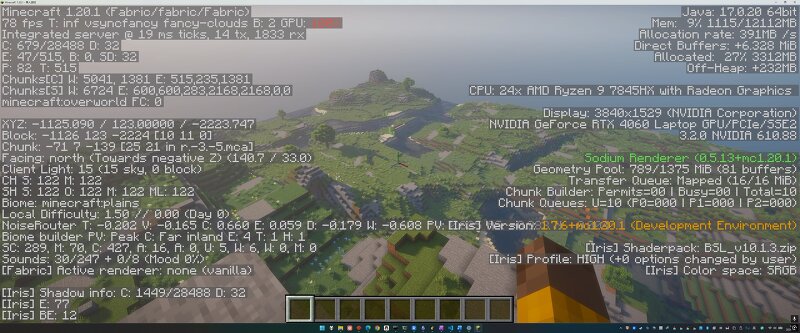
Creator notes
What it is: CoreSwap rewrites Minecraft Java Edition's performance-critical cores — world generation and entity AI/pathfinding — in C++, while keeping the full Java mod ecosystem intact. Same seed. Same world. Same mods. The C++ goes underneath. Why: Java Edition's performance has been a meme for two decades. Every existing fix has a fatal flaw:[td][table background=null] [tbody] [tr] [td width=]Approach[/td] [td width=]Flaw[/td] [/tr] [tr] [td]Paper & optimization plugins[/td] [td]Still Java — treats symptoms, not causes[/td] [/tr] [tr] [td]Cuberite (full C++ rewrite)[/td] [td]Fast, but the mod ecosystem dies[/td] [/tr] [tr] [td]Switch to Bedrock[/td] [td]Ecosystem gone, version drift forever[/td] [/tr] [/tbody] [/table]CoreSwap walks the path nobody has walked: [b]C++ performance core + Java mod layer (JNI bridge)[/b] — the mod API stays Java and untouched; everything below it is free to become C++.[b]v1.0.0 (MC 1.20.1, Fabric):[/b][list] [*]✅ [b]NOISE+SURFACE (density / aquifer / ore veins / surface rules) 100% bit-identical to vanilla[/b] — same seed, same terrain, block-for-block (exact IEEE double)[/*] [*]✅ [b]10-20× faster worldgen[/b]: batched parallel generation (~3 ms/chu
Added value
What’s included on this page
Preview, categories, compatibility, and tools on this page — not a bare file mirror.
- Creator
- unknowbug
- Source
- Minecraft downloads library on Eaglercraft Studio
- Type
- Minecraft mod
- Price
- Free download on Eaglercraft Studio
- Curation
- Listed with credit to unknowbug · studio preview & install guide
- Game Version
- Minecraft 1.20.1
- Compatible with
- Minecraft Java (match version / loader in facts)
- Tags
- Functional
Install guide
How to install this free Minecraft mod
Eaglercraft Studio listing with metadata, creator credit, and loader-aware install guidance.
- 1Download the jar/zip when available.
- 2Install the matching loader (Forge, Fabric, or NeoForge) for your Minecraft version.
- 3Drop the mod into your mods folder, then launch with that profile.
Wrong loader or game version usually crashes on startup — read the facts on this page first.
Related free mods
More curated mods from the same library section.

Pastelmooncrafting15 · 67 diamonds · 20 views

PotatoWolfie · 60 diamonds · 2 views

PotatoWolfie · 53 diamonds · 622 views

Janss_33PL · 47 diamonds · 940 views