
CrAcKeD_mOdEr JAVA PVP WORKING
Creator: CrAcKeD_mOdEr · 2026-01-15 · Mods · Free on Eaglercraft Studio
Download CrAcKeD_mOdEr JAVA PVP WORKING — free Minecraft mod. Created by CrAcKeD_mOdEr. Tagged other. Check the file details for Forge, Fabric, or NeoForge before installing.
Creator notes
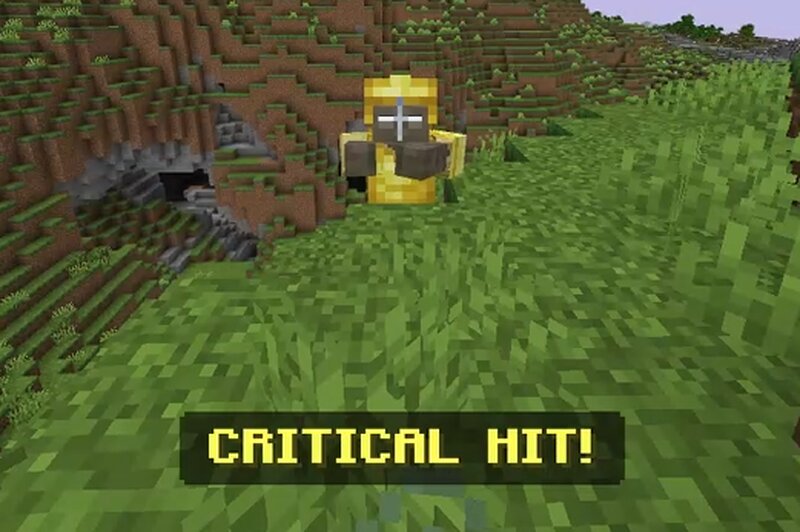
⚔️ CrAcKeD Java Combat: The Ultimate PvP Overhaul ⚔️ Tired of "spam-clicking" on Bedrock? This mod brings the high-skill combat mechanics of Java Edition (1.9+) to Minecraft Bedrock! Master the timing, land the crits, and dominate the arena. 📜 HOW IT WORKS: This mod changes the core logic of how weapons deal damage. No more "whoever clicks fastest wins"—now, it’s about timing and skill . 🛠 FEATURES: ⏳ Attack Cooldown: If you spam click, your damage is reduced to almost nothing! Wait for the "Full Swing" to deal max damage. ✨ True Critical Hits: Jump-attack your enemies to land a CRITICAL HIT! Includes Java-style orange particles and the satisfying "Crit" sound effect. ⚠️ Cooldown Alerts: A HUD message in your Action Bar tells you when you're clicking too fast or when you’ve landed a massive blow. 🔥 Java Sounds & Particles: Every hit feels more "crisp" with particles and sounds synced to your attacks. 🕹 HOW TO USE: Enable Beta APIs: You MUST turn on "Beta APIs" in your World Settings experiments for this mod to work! Wait for the Swing: Watch your Action Bar. If it says "✖ Cooldown!" , you are hitting too fast. Wait for "✔ Full Swing" for the kill. The Jump-Shot: Jump while falling
Added value
What’s included on this page
Preview, categories, compatibility, and tools on this page — not a bare file mirror.
- Creator
- CrAcKeD_mOdEr
- Source
- Minecraft downloads library on Eaglercraft Studio
- Type
- Minecraft mod
- Price
- Free download on Eaglercraft Studio
- Curation
- Listed with credit to CrAcKeD_mOdEr · studio preview & install guide
- Game Version
- Minecraft 1.21.11
- Compatible with
- Minecraft Java (match version / loader in facts)
- Tags
- Other
Install guide
How to install this free Minecraft mod
Eaglercraft Studio listing with metadata, creator credit, and loader-aware install guidance.
- 1Download the jar/zip when available.
- 2Install the matching loader (Forge, Fabric, or NeoForge) for your Minecraft version.
- 3Drop the mod into your mods folder, then launch with that profile.
Wrong loader or game version usually crashes on startup — read the facts on this page first.
Related free mods
More curated mods from the same library section.

Pastelmooncrafting15 · 67 diamonds · 20 views

PotatoWolfie · 60 diamonds · 2 views

PotatoWolfie · 53 diamonds · 622 views

Janss_33PL · 47 diamonds · 940 views