
Create: Lights & Controls
Creator: Moubarack · 2026-07-08 · Mods · Free on Eaglercraft Studio
Download Create: Lights & Controls — free Minecraft mod. Created by Moubarack. Tagged addon, create, new content. Check the file details for Forge, Fabric, or NeoForge before installing.
Creator notes
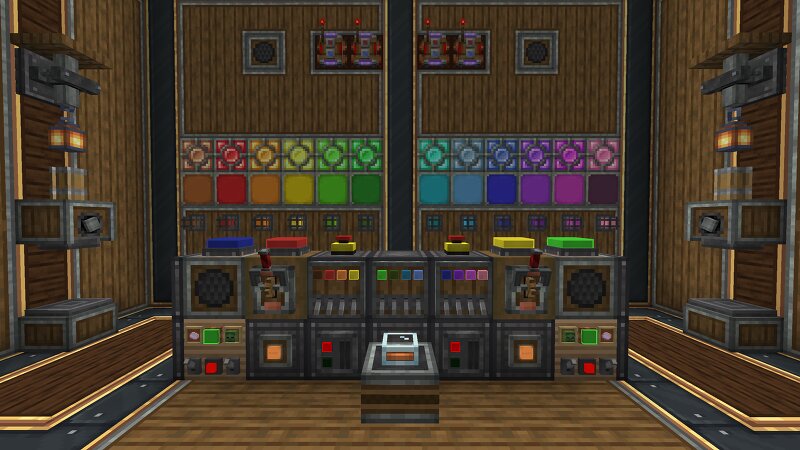
⚙️ Create: Lights & Controls : A Create add-on that brings a full set of lighting , redstone control , access and sound blocks ; all built to plug straight into Create's Redstone Link network for clean, wireless automation . 💡 Lighting : Crystal Lamps - sleek colored lamps in 14 dye colors . Caged Signal Lights - rugged industrial cage lights in 14 colors . Inlaid Flat Lights - slim panels that sit flush against any surface, in 14 colors . Large Tint Lights - standalone surface-mounted lights in Andesite, Industrial, Copper and Brass casings. The bulb is dyeable to any color , invertible, and links to a frequency. Every light emits full brightness when active and can be inverted ; so it glows while unpowered and turns off when it receives a signal. 🧩 Modules : The Module Panel (Module Anchor) is a wall-mounted chassis that holds several small modules at once — shift+right-click a module item onto any surface and it snaps onto a panel automatically (creating one if needed). 🔢 326.9 billion possible module combinations per panel Mix module types, casings, colors and layouts — no two panels have to look alike. Modular Button - dyeable button, wireless frequency, clipboard copy/paste.
Added value
What’s included on this page
Preview, categories, compatibility, and tools on this page — not a bare file mirror.
- Creator
- Moubarack
- Source
- Minecraft downloads library on Eaglercraft Studio
- Type
- Minecraft mod
- Price
- Free download on Eaglercraft Studio
- Curation
- Listed with credit to Moubarack · studio preview & install guide
- Game Version
- Minecraft 1.21.1
- Compatible with
- Minecraft Java (match version / loader in facts)
- Tags
- Addon, Create, New Content
Install guide
How to install this free Minecraft mod
Eaglercraft Studio listing with metadata, creator credit, and loader-aware install guidance.
- 1Download the jar/zip when available.
- 2Install the matching loader (Forge, Fabric, or NeoForge) for your Minecraft version.
- 3Drop the mod into your mods folder, then launch with that profile.
Wrong loader or game version usually crashes on startup — read the facts on this page first.
Related free mods
More curated mods from the same library section.

Pastelmooncrafting15 · 67 diamonds · 20 views

PotatoWolfie · 60 diamonds · 2 views

PotatoWolfie · 53 diamonds · 622 views

Janss_33PL · 47 diamonds · 940 views