
Creepy Duck
Creator: Sergey7363635 · 2026-09-25 · Mods · Free on Eaglercraft Studio
Download Creepy Duck — free Minecraft mod. Created by Sergey7363635. Tagged bedrock, creepy, horror, new content. Check the file details for Forge, Fabric, or NeoForge before installing.
Creator notes
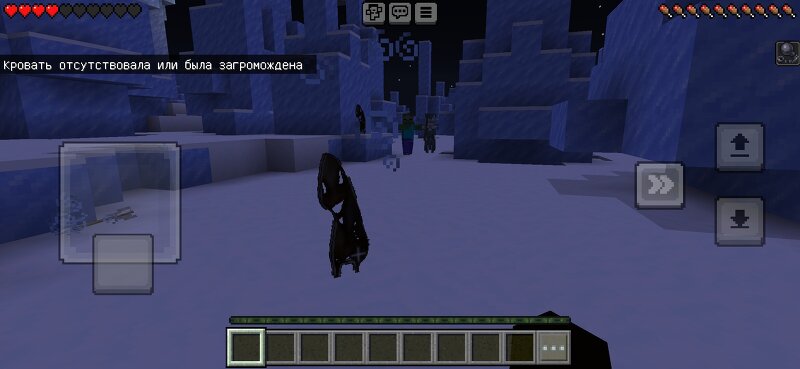
Creepy Duck — Horror Addon for Minecraft Bedrock Short description:Something that looks like a duck appears near your bed at night. It stares. It walks. It breaks your bed and attacks you. You will never sleep peacefully again. Full description: Creepy Duck adds two custom horror mobs: • Creepy Duck (creepy:duck) — Tall dark silhouette figure• Creepy Duck Stare (creepy:duck_stare) — Front-facing duck with spread wings and empty eyes Features:• Spawn at night near the player's bed (or respawn point)• Break any color of bed when they get close• Hostile to players and villagers• Deal damage + Slowness effect• Drop feathers and rotten flesh• Spawn eggs available in Creative mode• English and Russian names supported Commands:/summon creepy:duck/summon creepy:duck_stare Installation:1. Download the .mcaddon file2. Open it — Minecraft will import both packs automatically3. Enable the Resource Pack and Behavior Pack in your world4. Recommended: new world. If the script doesn't work, enable Beta APIs experiment Important:• Minecraft Bedrock only (1.21+)• Not for Java Edition• Flat billboard-style models (intentional design) Version: 1.1Type: Behavior Pack + Resource Pack Sleep tight... if y
Added value
What’s included on this page
Preview, categories, compatibility, and tools on this page — not a bare file mirror.
- Creator
- Sergey7363635
- Source
- Minecraft downloads library on Eaglercraft Studio
- Type
- Minecraft mod
- Price
- Free download on Eaglercraft Studio
- Curation
- Listed with credit to Sergey7363635 · studio preview & install guide
- Game Version
- Minecraft 26.3 snapshot
- Compatible with
- Minecraft Java (match version / loader in facts)
- Tags
- Bedrock, Creepy, Horror, New Content
Install guide
How to install this free Minecraft mod
Eaglercraft Studio listing with metadata, creator credit, and loader-aware install guidance.
- 1Download the jar/zip when available.
- 2Install the matching loader (Forge, Fabric, or NeoForge) for your Minecraft version.
- 3Drop the mod into your mods folder, then launch with that profile.
Wrong loader or game version usually crashes on startup — read the facts on this page first.
Related free mods
More curated mods from the same library section.

Pastelmooncrafting15 · 67 diamonds · 20 views

PotatoWolfie · 60 diamonds · 2 views

PotatoWolfie · 53 diamonds · 622 views

Janss_33PL · 47 diamonds · 940 views