
cyankeys
Creator: cyanpath · 2026-05-29 · Mods · Free on Eaglercraft Studio
Download cyankeys — free Minecraft mod. Created by cyanpath. Tagged cyan, cyankeys, functional, hotkey. Check the file details for Forge, Fabric, or NeoForge before installing.
Creator notes
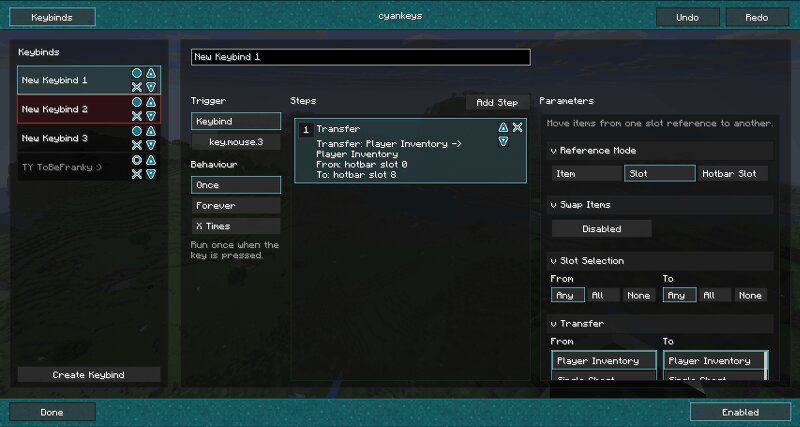
# cyankeys A client-side macro keybind mod, focused on making repeated inventory and action workflows faster. Create named keybinds, assign them to keyboard or mouse inputs, and build small macro sequences for common tasks like moving items, dropping items, running client commands, or sending chat messages. ## Features - Create custom macro keybinds in-game - Bind macros to keyboard keys or mouse buttons - Transfer items between player inventory and containers - Select items by item type, slot, or hotbar slot - Drop selected items with a keybind - Run client commands or send chat messages - Choose trigger behavior like once, repeat, or toggle repeat - Configure through ModMenu, with fallback keybinds for settings and enable/disable ## Inventory Support Supports common container layouts such as player inventory, chests, hoppers, droppers, furnaces, shulker boxes, crafting stations, and configurable custom grids. Inventory actions are performed through normal screen-handler click operations on supported platforms instead of directly editing the client inventory.
Added value
What’s included on this page
Preview, categories, compatibility, and tools on this page — not a bare file mirror.
- Creator
- cyanpath
- Source
- Minecraft downloads library on Eaglercraft Studio
- Type
- Minecraft mod
- Price
- Free download on Eaglercraft Studio
- Curation
- Listed with credit to cyanpath · studio preview & install guide
- Game Version
- Minecraft 26.1.2
- Compatible with
- Minecraft Java (match version / loader in facts)
- Tags
- Cyan, Cyankeys, Functional, Hotkey, Keybind, Macro
Install guide
How to install this free Minecraft mod
Eaglercraft Studio listing with metadata, creator credit, and loader-aware install guidance.
- 1Download the jar/zip when available.
- 2Install the matching loader (Forge, Fabric, or NeoForge) for your Minecraft version.
- 3Drop the mod into your mods folder, then launch with that profile.
Wrong loader or game version usually crashes on startup — read the facts on this page first.
Related free mods
More curated mods from the same library section.

Pastelmooncrafting15 · 67 diamonds · 20 views

PotatoWolfie · 60 diamonds · 2 views

PotatoWolfie · 53 diamonds · 622 views

Janss_33PL · 47 diamonds · 940 views