
Debug Items
Creator: RedCarlie · 2026-09-16 · Mods · Free on Eaglercraft Studio
Download Debug Items — free Minecraft mod. Created by RedCarlie. Tagged blackscreen, blockofsky, blocks, bluescreen. Check the file details for Forge, Fabric, or NeoForge before installing.
Creator notes
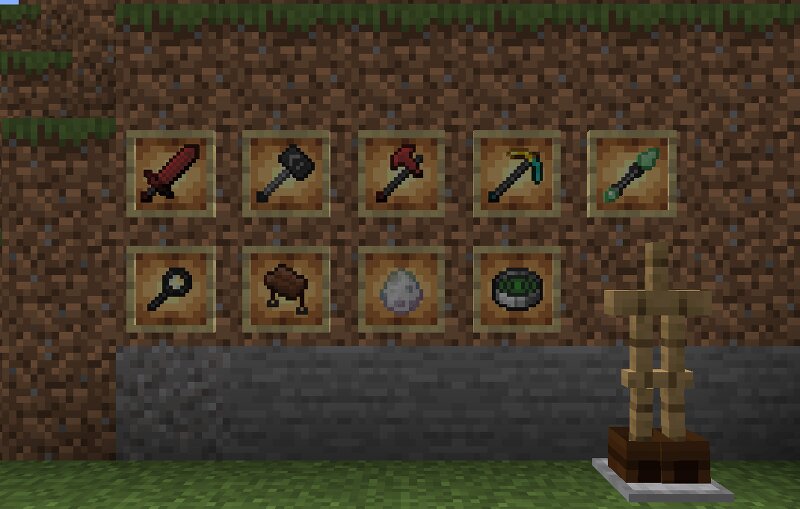
I felt that when coding more complicated Mods, some things could have been more stream-lined? Such as: Instantly killing a mob without typing a long command. Locating any mob to test spawnrates. Etc! So I made this mod to make that easier! With blocks that add to the whole vibe with a block of sky, this time shader compatible! A green, blue, white and black screen! And more! Features New items which make debugging and testing much easier. Mob Killer (Living Bane) and Mob Despawner (Mob Remover). These bypass any effects and creates a new damage type to instantly kill any mob it hits. And the Despawner does exactly what it says! Pause Hammer (Creature Pauser). Effects the target with Slowness X for 29826 minutes, or shift-clicking pauses the AI. Clicking again removes the effects. The Rejuvinator. Hitting a target restores them back to full health. Shift-Clicking a target Heals the target, cleanses their effects, unpauses and resets their AI. Screen Blocks. A working Green, White, Black and Blue screen for your world! Great for content creation. Sky Block. A block made of Sky! It stops rendering anything you see through it, creating the illusion of the block being made of the sky. T
Added value
What’s included on this page
Preview, categories, compatibility, and tools on this page — not a bare file mirror.
- Creator
- RedCarlie
- Source
- Minecraft downloads library on Eaglercraft Studio
- Type
- Minecraft mod
- Price
- Free download on Eaglercraft Studio
- Curation
- Listed with credit to RedCarlie · studio preview & install guide
- Game Version
- Minecraft 1.20.1
- Compatible with
- Minecraft Java (match version / loader in facts)
- Tags
- Blackscreen, Blockofsky, Blocks, Bluescreen, Debug, Debugging
Install guide
How to install this free Minecraft mod
Eaglercraft Studio listing with metadata, creator credit, and loader-aware install guidance.
- 1Download the jar/zip when available.
- 2Install the matching loader (Forge, Fabric, or NeoForge) for your Minecraft version.
- 3Drop the mod into your mods folder, then launch with that profile.
Wrong loader or game version usually crashes on startup — read the facts on this page first.
Related free mods
More curated mods from the same library section.

Pastelmooncrafting15 · 67 diamonds · 20 views

PotatoWolfie · 60 diamonds · 2 views

PotatoWolfie · 53 diamonds · 622 views

Janss_33PL · 47 diamonds · 940 views