
decor & adventure
Creator: kevinjinseynbuggy · 2026-05-25 · Mods · Free on Eaglercraft Studio
Download decor & adventure — free Minecraft mod. Created by kevinjinseynbuggy. Tagged aesthetic. Check the file details for Forge, Fabric, or NeoForge before installing.
Creator notes
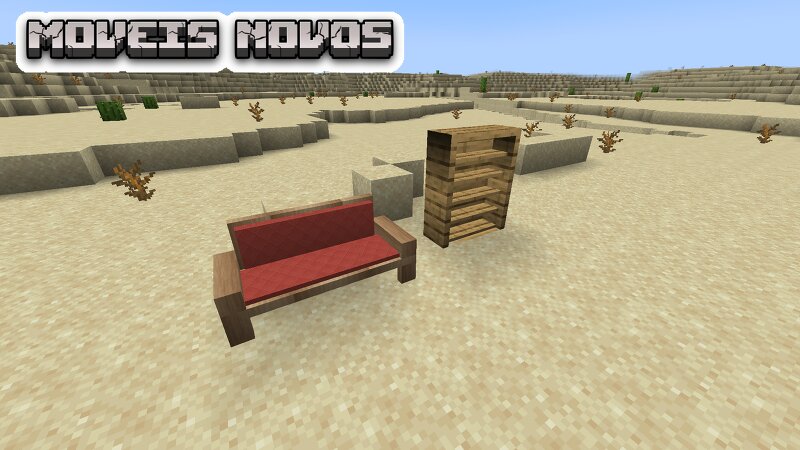
Estou fazendo meu mod no mcreator e esse é meu primeiro mod. 🌍 Decor & Adventure Mod Decor & Adventure is the perfect Minecraft mod for players who love detailed builds but also crave action and exploration. 🛋️ New Furniture and Decor Transform your base with functional furniture—ranging from modern to rustic styles: Appliances: Microwaves, blenders, modern sinks, and refrigerators. Living Room: Upholstered sofas, armchairs, and shelves. Outdoor Area: A functional lawnmower to keep your grass neatly trimmed. ⚔️ Combat and Adventure Heavy Weapons: Ditch the standard swords and wield high-tier weaponry, including a powerful 3D Minigun. 👥 Unique Villagers and NPCs Encounter custom, themed NPCs throughout your world: Police Villager: Protecting your settlements. "Boss" Villager: Sporting a black suit, sunglasses, and a giant gold chain. Cyborg Villager: Sells electronics. 🌍 Decor & Adventure Mod Transforme completamente a sua experiência no Minecraft com o Decor & Adventure ! Este mod é a união perfeita para quem ama construir e decorar bases detalhadas, mas não abre mão de uma boa dose de ação, novos perigos e itens modernos. 🛋️ Decoração e Móveis Novos (Modernos e Rústicos) Dê vida n
Added value
What’s included on this page
Preview, categories, compatibility, and tools on this page — not a bare file mirror.
- Creator
- kevinjinseynbuggy
- Source
- Minecraft downloads library on Eaglercraft Studio
- Type
- Minecraft mod
- Price
- Free download on Eaglercraft Studio
- Curation
- Listed with credit to kevinjinseynbuggy · studio preview & install guide
- Game Version
- Minecraft 1.20.1
- Compatible with
- Minecraft Java (match version / loader in facts)
- Tags
- Aesthetic
Install guide
How to install this free Minecraft mod
Eaglercraft Studio listing with metadata, creator credit, and loader-aware install guidance.
- 1Download the jar/zip when available.
- 2Install the matching loader (Forge, Fabric, or NeoForge) for your Minecraft version.
- 3Drop the mod into your mods folder, then launch with that profile.
Wrong loader or game version usually crashes on startup — read the facts on this page first.
Related free mods
More curated mods from the same library section.

Pastelmooncrafting15 · 67 diamonds · 20 views

PotatoWolfie · 60 diamonds · 2 views

PotatoWolfie · 53 diamonds · 622 views

Janss_33PL · 47 diamonds · 940 views