
Dithering3D
Creator: cedrou · 2026-01-07 · Mods · Free on Eaglercraft Studio
Download Dithering3D — free Minecraft mod. Created by cedrou. Tagged aesthetic, blackandwhite, crt, darkfantasy. Check the file details for Forge, Fabric, or NeoForge before installing.
Creator notes
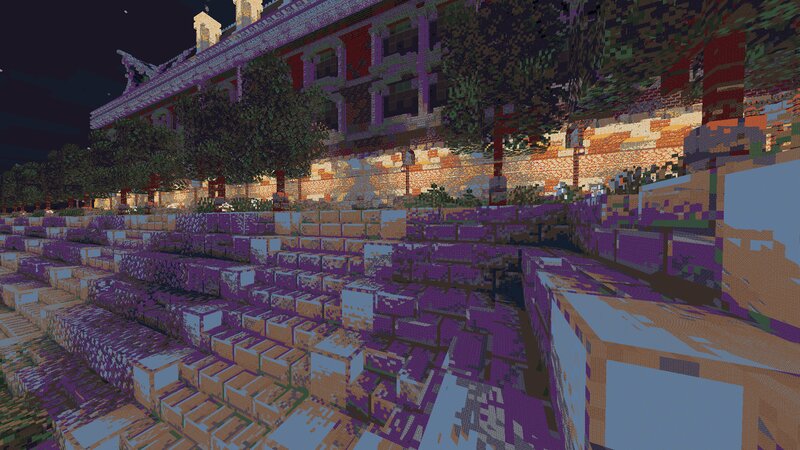
🎨 Dithering3D - Surface-Stable Fractal Dithering ____________________________________________________________________ ____________________________________________________________________ ✨ A Revolutionary Visual Experience Transform your Minecraft world with Surface-Stable Fractal Dithering — a groundbreaking rendering technique where dither dots stick to 3D surfaces instead of the screen, creating a unique manga/comic book aesthetic that feels alive. 🎬 Based on the innovative work by Rune Skovbo Johansen — Watch the explainer video ____________________________________________________________________ 🖼️ What Makes This Shader Special? 📌 Surface-Stable Dots Unlike traditional dithering where patterns "swim" on screen, Dither3D anchors each dot to the actual 3D surface. Walk around blocks, and the dots stay perfectly attached! 🔄 Fractal Scaling Magic As you move closer or farther from surfaces, dots dynamically split or merge to maintain constant screen-space density. It's mesmerizing to watch! 🎨 Three Color Modes Grayscale Classic black & white dithering — clean, minimalist, timeless RGB Each color channel gets its own dot layer — vibrant and unique CMYK Halftone Authentic newspaper
Added value
What’s included on this page
Preview, categories, compatibility, and tools on this page — not a bare file mirror.
- Creator
- cedrou
- Source
- Minecraft downloads library on Eaglercraft Studio
- Type
- Minecraft mod
- Price
- Free download on Eaglercraft Studio
- Curation
- Listed with credit to cedrou · studio preview & install guide
- Game Version
- Minecraft 1.21.11
- Compatible with
- Minecraft Java (match version / loader in facts)
- Tags
- Aesthetic, Blackandwhite, Crt, Darkfantasy, Dithering, Pixel
Install guide
How to install this free Minecraft mod
Eaglercraft Studio listing with metadata, creator credit, and loader-aware install guidance.
- 1Download the jar/zip when available.
- 2Install the matching loader (Forge, Fabric, or NeoForge) for your Minecraft version.
- 3Drop the mod into your mods folder, then launch with that profile.
Wrong loader or game version usually crashes on startup — read the facts on this page first.
Related free mods
More curated mods from the same library section.

Pastelmooncrafting15 · 67 diamonds · 20 views

PotatoWolfie · 60 diamonds · 2 views

PotatoWolfie · 53 diamonds · 622 views

Janss_33PL · 47 diamonds · 940 views