
DonutSMP Reconnect
Creator: Jahnar · 2026-03-21 · Mods · Free on Eaglercraft Studio
Download DonutSMP Reconnect — free Minecraft mod. Created by Jahnar. Tagged donutsmp, drdonut, drdonutt, farex. Check the file details for Forge, Fabric, or NeoForge before installing.
Creator notes
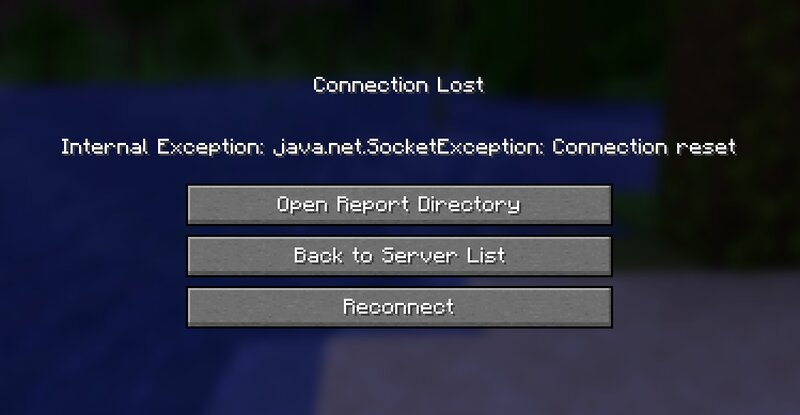
DonutSMP Reconnect Adds a simple Reconnect button to the disconnect screen, so you can jump back into DonutSMP (or any server) instantly after a disconnect. Instead of backing out, reopening Multiplayer, and selecting the server again, you can reconnect with a single click right where you already are. It is a tiny quality-of-life improvement designed for players who get kicked, timed out, or disconnected often and just want to get back in fast. Why Getting kicked or timed out and then manually typing/reselecting the server is annoying. This mod adds one button to make that instant. Features Adds a Reconnect button on the disconnected screen Reconnects to your most recently joined server Only appears when a valid last server exists Client-side only Compatibility Minecraft: 1.21.x builds provided Loader: Fabric Environment: Client Installation Install Fabric Loader Download the mod jar from Modrinth Put the jar into your .minecraft/mods folder Launch the game Usage When you get disconnected, click Reconnect on the disconnect screen. Notes This mod does not add server-side content. Safe to use on vanilla and modded servers.
Added value
What’s included on this page
Preview, categories, compatibility, and tools on this page — not a bare file mirror.
- Creator
- Jahnar
- Source
- Minecraft downloads library on Eaglercraft Studio
- Type
- Minecraft mod
- Price
- Free download on Eaglercraft Studio
- Curation
- Listed with credit to Jahnar · studio preview & install guide
- Game Version
- Minecraft 1.21.11
- Compatible with
- Minecraft Java (match version / loader in facts)
- Tags
- Donutsmp, Drdonut, Drdonutt, Farex, Hypixel, Other
Install guide
How to install this free Minecraft mod
Eaglercraft Studio listing with metadata, creator credit, and loader-aware install guidance.
- 1Download the jar/zip when available.
- 2Install the matching loader (Forge, Fabric, or NeoForge) for your Minecraft version.
- 3Drop the mod into your mods folder, then launch with that profile.
Wrong loader or game version usually crashes on startup — read the facts on this page first.
Related free mods
More curated mods from the same library section.

Pastelmooncrafting15 · 67 diamonds · 20 views

PotatoWolfie · 60 diamonds · 2 views

PotatoWolfie · 53 diamonds · 622 views

Janss_33PL · 47 diamonds · 940 views