
Doorways
Creator: ItsShoon · 2026-08-31 · Mods · Free on Eaglercraft Studio
Download Doorways — free Minecraft mod. Created by ItsShoon. Tagged functional. Check the file details for Forge, Fabric, or NeoForge before installing.
Creator notes
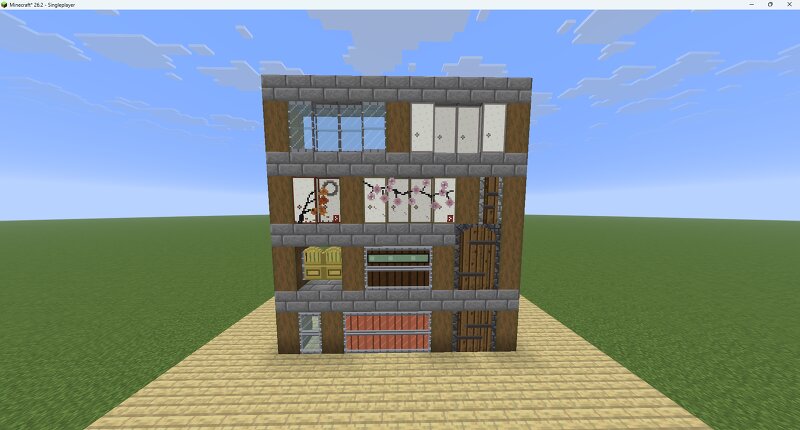
Wide doors that actually open wide. One block, two, three or four — and always one door , not several stacked side by side. Eight styles Solid — a full panel, in every wood, in iron and in all eight copper states Glazed — glass in the upper half Glass — glass from top to bottom, in an iron frame Saloon — spindles under an arched rail, open above and below, hung on spring hinges. Two and four blocks wide, in wood Bookshelf — a wall of books that opens Fusuma — papered panels that slide aside instead of swinging out, and that can be painted. Two and four blocks wide, in wood Sliding glass — the same mechanism, glazed Stone — a leaf of weathered boards strapped in iron, hung in a doorway of masonry. One and two blocks wide, two or three tall 234 doors in all. How they behave Break any part and the whole door comes down, dropping a single item. Redstone treats it as one unit: a pressure plate in front of a four-wide door works wherever it sits against it. Opening a three- or four-wide door moves blocks — the leaf swings out of its frame. If something is in the way it refuses to open and says so. Grass and flowers in the path are broken properly, with their drops. Copper doors oxidise o
Added value
What’s included on this page
Preview, categories, compatibility, and tools on this page — not a bare file mirror.
- Creator
- ItsShoon
- Source
- Minecraft downloads library on Eaglercraft Studio
- Type
- Minecraft mod
- Price
- Free download on Eaglercraft Studio
- Curation
- Listed with credit to ItsShoon · studio preview & install guide
- Game Version
- Minecraft 26.2
- Compatible with
- Minecraft Java (match version / loader in facts)
- Tags
- Functional
Install guide
How to install this free Minecraft mod
Eaglercraft Studio listing with metadata, creator credit, and loader-aware install guidance.
- 1Download the jar/zip when available.
- 2Install the matching loader (Forge, Fabric, or NeoForge) for your Minecraft version.
- 3Drop the mod into your mods folder, then launch with that profile.
Wrong loader or game version usually crashes on startup — read the facts on this page first.
Related free mods
More curated mods from the same library section.

Pastelmooncrafting15 · 67 diamonds · 20 views

PotatoWolfie · 60 diamonds · 2 views

PotatoWolfie · 53 diamonds · 622 views

Janss_33PL · 47 diamonds · 940 views