
Dragon Hunt Rivals (Fun game!)
Creator: Pious880 · 2026-07-18 · Mods · Free on Eaglercraft Studio
Download Dragon Hunt Rivals (Fun game!) — free Minecraft mod. Created by Pious880. Tagged battle, enderdragon, friends, fun. Check the file details for Forge, Fabric, or NeoForge before installing.
Creator notes
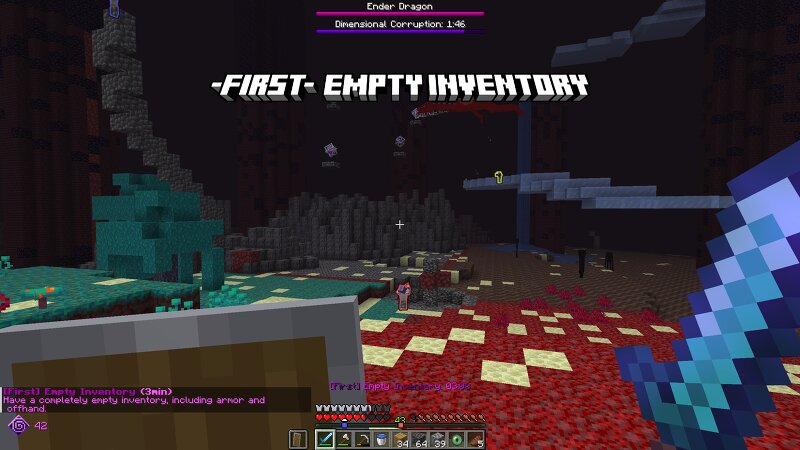
Dragon Hunt Rivals THERE IS AN INGAME EXPLANATION WITH ANIMATIONS (ENG/GER) Goal: Be the first team to defeat the Ender Dragon. How It Works: Dragon Hunt Rivals is a team-based Minecraft race mode. Teams earn points by completing: Challenges Milestones Advancements Shop & Points: Use your points in the shop to buy helpful buffs, sabotage other teams, or influence World Events. You can open the shop with: /dhr the shop hotkey Challenges: Timed challenges appear during the match. They give teams extra ways to earn points while the main race continues. Milestones: Milestones reward the first team to complete important goals, like entering the Nether, finding structures, collecting key items, or reaching the End. World Events: World Events can change the game for everyone. They can create chaos, danger, or new opportunities during the race. Recommended after you have played the mode a few times. Team Strategy: Use buffs to help your team. Use debuffs to slow enemies down.
Added value
What’s included on this page
Preview, categories, compatibility, and tools on this page — not a bare file mirror.
- Creator
- Pious880
- Source
- Minecraft downloads library on Eaglercraft Studio
- Type
- Minecraft mod
- Price
- Free download on Eaglercraft Studio
- Curation
- Listed with credit to Pious880 · studio preview & install guide
- Game Version
- Minecraft 26.1.2
- Compatible with
- Minecraft Java (match version / loader in facts)
- Tags
- Battle, Enderdragon, Friends, Fun, Game, Minigame
Install guide
How to install this free Minecraft mod
Eaglercraft Studio listing with metadata, creator credit, and loader-aware install guidance.
- 1Download the jar/zip when available.
- 2Install the matching loader (Forge, Fabric, or NeoForge) for your Minecraft version.
- 3Drop the mod into your mods folder, then launch with that profile.
Wrong loader or game version usually crashes on startup — read the facts on this page first.
Related free mods
More curated mods from the same library section.

Pastelmooncrafting15 · 67 diamonds · 20 views

PotatoWolfie · 60 diamonds · 2 views

PotatoWolfie · 53 diamonds · 622 views

Janss_33PL · 47 diamonds · 940 views