
DUATAR: Minimap & Map
Creator: Taso54 · 2026-08-27 · Mods · Free on Eaglercraft Studio
Download DUATAR: Minimap & Map — free Minecraft mod. Created by Taso54. Tagged map, minimap, new content. Check the file details for Forge, Fabric, or NeoForge before installing.
Creator notes
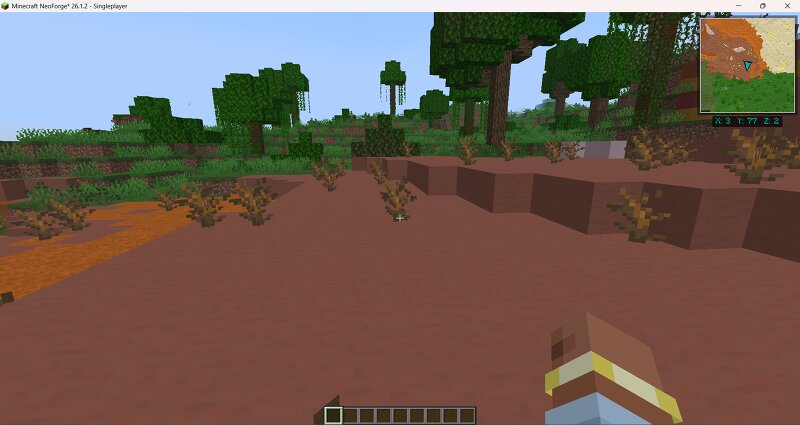
DUATAR: Minimap & Map provides a clean and straightforward mapping experience while preserving Minecraft’s exploration-focused gameplay. It includes a minimap, a full-screen map, coordinates, cave mapping, and simple map annotations—without adding a complex waypoint or navigation system. Features - A fixed north-up minimap in the top-right corner - A large map opened with the **M** key - A dark aqua player arrow that follows your viewing direction - Live **X, Y, and Z coordinates** - Detailed terrain rendering based on blocks and biome colors - Improved grass, leaves, water, shoreline, and terrain-height details - Automatic cave mapping when exploring underground - Separate saved map data for each world, server, and dimension - Persistent explored terrain between game sessions - Simple annotations placed directly on the full map - No entity, mob, or player radar A Simple Map System This mod is intentionally designed as a simple map rather than a complete navigation system. There is "no waypoint system": - No waypoint icons displayed in the game world - No waypoint beams - No distance indicators - No waypoint teleportation - No deathpoints - No entity, mob, or player tracking The fu
Added value
What’s included on this page
Preview, categories, compatibility, and tools on this page — not a bare file mirror.
- Creator
- Taso54
- Source
- Minecraft downloads library on Eaglercraft Studio
- Type
- Minecraft mod
- Price
- Free download on Eaglercraft Studio
- Curation
- Listed with credit to Taso54 · studio preview & install guide
- Game Version
- Minecraft 26.1.2
- Compatible with
- Minecraft Java (match version / loader in facts)
- Tags
- Map, Minimap, New Content
Install guide
How to install this free Minecraft mod
Eaglercraft Studio listing with metadata, creator credit, and loader-aware install guidance.
- 1Download the jar/zip when available.
- 2Install the matching loader (Forge, Fabric, or NeoForge) for your Minecraft version.
- 3Drop the mod into your mods folder, then launch with that profile.
Wrong loader or game version usually crashes on startup — read the facts on this page first.
Related free mods
More curated mods from the same library section.

Pastelmooncrafting15 · 67 diamonds · 20 views

PotatoWolfie · 60 diamonds · 2 views

PotatoWolfie · 53 diamonds · 622 views

Janss_33PL · 47 diamonds · 940 views