
DUATAR: Private Trade
Creator: Taso54 · 2026-08-24 · Mods · Free on Eaglercraft Studio
Download DUATAR: Private Trade — free Minecraft mod. Created by Taso54. Tagged new content, privatetrade, trade. Check the file details for Forge, Fabric, or NeoForge before installing.
Creator notes
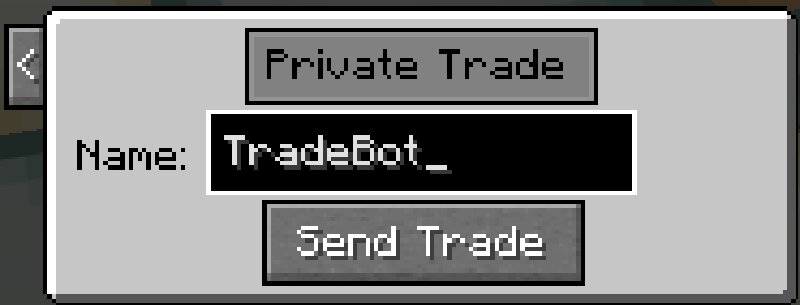
DUATAR: Private Trade DUATAR: Private Trade allows players on the same server to trade items from anywhere using a mutual confirmation system. Features Send private trade requests using player names 9 trade slots for each player View the other player’s offer in real time Mutual ready/confirmation system Ready status automatically resets when an offer changes 30-second trade request timeout Items are returned to their owners if the trade is cancelled Players cannot take items directly from the other player’s offer Server-managed trade transactions How to Use Press R by default to open the trade request menu. Enter the exact Minecraft username of the player you want to trade with. Click Send Trade . The receiving player can accept the request with ✓ or decline it with X . When the request is accepted, both players are taken to the trade screen. Place the items you want to offer into your 9 trade slots. Review the other player’s offer and select your confirmation box when ready. The trade is automatically completed when both players are ready. If either player changes their offer, the ready statuses are reset and both players must confirm the updated trade again. This prevents unnotic
Added value
What’s included on this page
Preview, categories, compatibility, and tools on this page — not a bare file mirror.
- Creator
- Taso54
- Source
- Minecraft downloads library on Eaglercraft Studio
- Type
- Minecraft mod
- Price
- Free download on Eaglercraft Studio
- Curation
- Listed with credit to Taso54 · studio preview & install guide
- Game Version
- Minecraft 26.1.2
- Compatible with
- Minecraft Java (match version / loader in facts)
- Tags
- New Content, Privatetrade, Trade
Install guide
How to install this free Minecraft mod
Eaglercraft Studio listing with metadata, creator credit, and loader-aware install guidance.
- 1Download the jar/zip when available.
- 2Install the matching loader (Forge, Fabric, or NeoForge) for your Minecraft version.
- 3Drop the mod into your mods folder, then launch with that profile.
Wrong loader or game version usually crashes on startup — read the facts on this page first.
Related free mods
More curated mods from the same library section.

Pastelmooncrafting15 · 67 diamonds · 20 views

PotatoWolfie · 60 diamonds · 2 views

PotatoWolfie · 53 diamonds · 622 views

Janss_33PL · 47 diamonds · 940 views