
DUATAR: Raids & Bloodmoon
Creator: Taso54 · 2026-08-30 · Mods · Free on Eaglercraft Studio
Download DUATAR: Raids & Bloodmoon — free Minecraft mod. Created by Taso54. Tagged bloodmoon, new content, raids. Check the file details for Forge, Fabric, or NeoForge before installing.
Creator notes
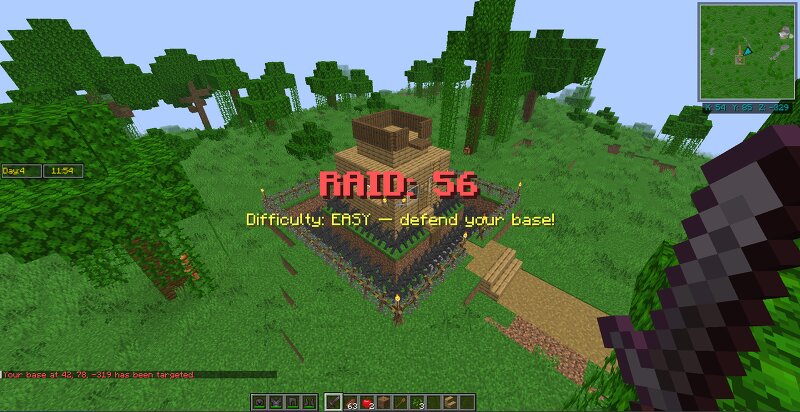
# DUATAR: Raids & Bloodmoon DUATAR: Raids & Bloodmoon introduces two recurring survival events: deadly Blood Moon nights and persistent raids directed at the player's base. Both systems use the shared day and clock provided by "DUATAR: Day & Time", allowing events to follow a consistent world schedule. Blood Moons A Blood Moon occurs every seventh day. - Begins at "20:00" on days 7, 14, 21, and so on - Ends at "06:00" the following morning - Uses the day and clock from DUATAR: Day & Time - Changes the moon to red - Covers the Overworld in dense red fog - Prevents players from sleeping through the event - Greatly increases hostile mob spawning - Supports up to 70 nearby hostile mobs within a 128-block region - Blood Moon monsters may spawn between 13 and 128 blocks from players - Spawn positions require a block-light level of 2 or lower - Humanoid monsters frequently appear with armor, weapons, and enchantments - Tracked Blood Moon monsters are ignited when the event ends at dawn Peaceful difficulty and the `doMobSpawning` game rule are respected. Base Raids The first raid is scheduled for "day 4 at 13:00". Later raids occur every seven days on days 11, 18, 25, and so on. A valid ba
Added value
What’s included on this page
Preview, categories, compatibility, and tools on this page — not a bare file mirror.
- Creator
- Taso54
- Source
- Minecraft downloads library on Eaglercraft Studio
- Type
- Minecraft mod
- Price
- Free download on Eaglercraft Studio
- Curation
- Listed with credit to Taso54 · studio preview & install guide
- Game Version
- Minecraft 26.1.2
- Compatible with
- Minecraft Java (match version / loader in facts)
- Tags
- Bloodmoon, New Content, Raids
Install guide
How to install this free Minecraft mod
Eaglercraft Studio listing with metadata, creator credit, and loader-aware install guidance.
- 1Download the jar/zip when available.
- 2Install the matching loader (Forge, Fabric, or NeoForge) for your Minecraft version.
- 3Drop the mod into your mods folder, then launch with that profile.
Wrong loader or game version usually crashes on startup — read the facts on this page first.
Related free mods
More curated mods from the same library section.

Pastelmooncrafting15 · 67 diamonds · 20 views

PotatoWolfie · 60 diamonds · 2 views

PotatoWolfie · 53 diamonds · 622 views

Janss_33PL · 47 diamonds · 940 views