
DUATAR: Safeguard
Creator: Taso54 · 2026-08-25 · Mods · Free on Eaglercraft Studio
Download DUATAR: Safeguard — free Minecraft mod. Created by Taso54. Tagged keepinventory, new content, notoolbreak, toolbreak. Check the file details for Forge, Fabric, or NeoForge before installing.
Creator notes
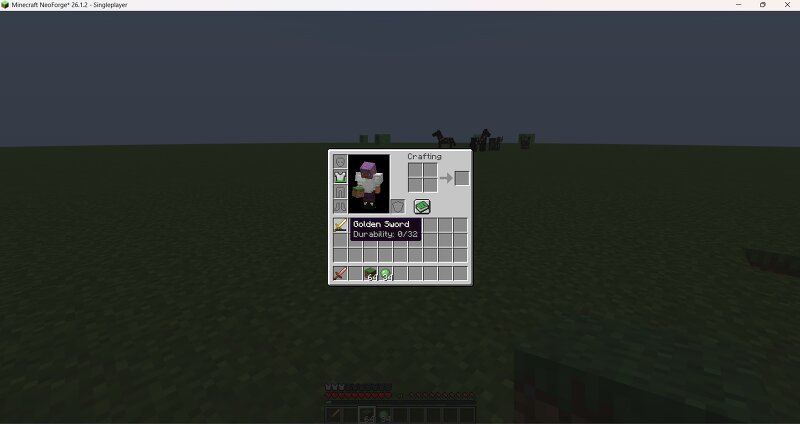
DUATAR Safeguard protects your inventory and equipment from permanent loss while keeping broken-item behavior balanced. Features Keeps the player’s inventory after death. Preserves experience levels through Minecraft’s keep_inventory rule. Prevents damageable items from breaking and disappearing at zero durability. Disables broken items until they are repaired. Broken weapons cannot attack. Broken tools cannot mine blocks. Broken items cannot perform normal interactions. Displays exact durability at the bottom of item tooltips: Durability: 50/100 Durability: 0/100 Supports vanilla items. Supports items from other mods that use Minecraft’s standard durability system. Works in singleplayer and multiplayer. Broken Item System When an item reaches zero durability, it remains in the player’s inventory instead of being destroyed. The item becomes unusable until it is repaired, allowing valuable or upgraded equipment to be recovered without providing unlimited use. Compatibility Modded weapons, tools, armor, and other equipment are automatically supported when they use Minecraft’s standard ItemStack durability system. Items that implement a completely custom durability system may not disp
Added value
What’s included on this page
Preview, categories, compatibility, and tools on this page — not a bare file mirror.
- Creator
- Taso54
- Source
- Minecraft downloads library on Eaglercraft Studio
- Type
- Minecraft mod
- Price
- Free download on Eaglercraft Studio
- Curation
- Listed with credit to Taso54 · studio preview & install guide
- Game Version
- Minecraft 26.1.2
- Compatible with
- Minecraft Java (match version / loader in facts)
- Tags
- Keepinventory, New Content, Notoolbreak, Toolbreak
Install guide
How to install this free Minecraft mod
Eaglercraft Studio listing with metadata, creator credit, and loader-aware install guidance.
- 1Download the jar/zip when available.
- 2Install the matching loader (Forge, Fabric, or NeoForge) for your Minecraft version.
- 3Drop the mod into your mods folder, then launch with that profile.
Wrong loader or game version usually crashes on startup — read the facts on this page first.
Related free mods
More curated mods from the same library section.

Pastelmooncrafting15 · 67 diamonds · 20 views

PotatoWolfie · 60 diamonds · 2 views

PotatoWolfie · 53 diamonds · 622 views

Janss_33PL · 47 diamonds · 940 views