
DUATAR: Tower
Creator: Taso54 · 2026-08-30 · Mods · Free on Eaglercraft Studio
Download DUATAR: Tower — free Minecraft mod. Created by Taso54. Tagged new content, structure, tower. Check the file details for Forge, Fabric, or NeoForge before installing.
Creator notes
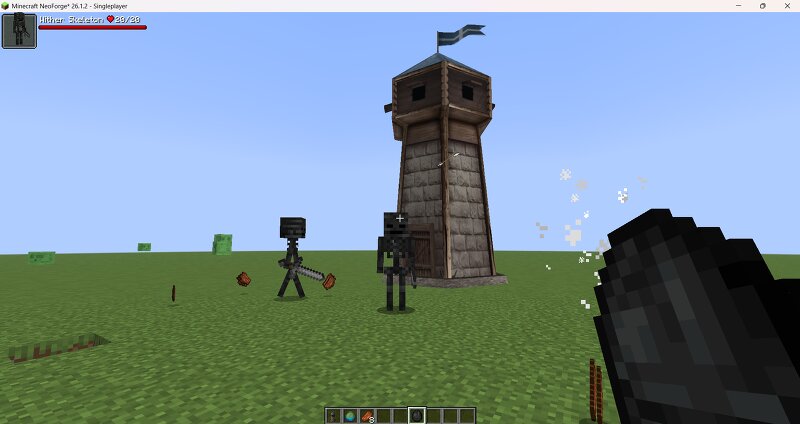
# DUATAR: Tower DUATAR: Tower adds a large, placeable defensive tower that automatically protects the surrounding area from hostile mobs. Once placed, the tower scans a **16-block horizontal radius**, selects the nearest hostile mob and fires a visible vanilla-style arrow every **2 seconds**. It continues attacking its current target until the target dies or leaves the area, then automatically switches to another nearby enemy. ## Features - Automatically targets hostile mobs within 16 blocks - Prioritizes the nearest available target - Keeps attacking the same target until it dies or leaves range - Automatically switches to the next hostile mob - Fires once every 2 seconds - Uses real vanilla arrow entities, movement, sound and damage behavior - Supports targets close to the base of the tower - Includes a placement screen for rotating the tower - Uses a 4 × 13 × 4 collision and placement area - Available in the vanilla Combat creative tab - No additional mod dependencies required ## Crafting Recipe The recipe requires full ingredient stacks. All listed quantities are consumed when the Tower is crafted. ```text 64 Planks 1 Banner 64 Planks 64 Stone Bricks 6 Dispensers 64 Stone Brick
Added value
What’s included on this page
Preview, categories, compatibility, and tools on this page — not a bare file mirror.
- Creator
- Taso54
- Source
- Minecraft downloads library on Eaglercraft Studio
- Type
- Minecraft mod
- Price
- Free download on Eaglercraft Studio
- Curation
- Listed with credit to Taso54 · studio preview & install guide
- Game Version
- Minecraft 26.1.2
- Compatible with
- Minecraft Java (match version / loader in facts)
- Tags
- New Content, Structure, Tower
Install guide
How to install this free Minecraft mod
Eaglercraft Studio listing with metadata, creator credit, and loader-aware install guidance.
- 1Download the jar/zip when available.
- 2Install the matching loader (Forge, Fabric, or NeoForge) for your Minecraft version.
- 3Drop the mod into your mods folder, then launch with that profile.
Wrong loader or game version usually crashes on startup — read the facts on this page first.
Related free mods
More curated mods from the same library section.

Pastelmooncrafting15 · 67 diamonds · 20 views

PotatoWolfie · 60 diamonds · 2 views

PotatoWolfie · 53 diamonds · 622 views

Janss_33PL · 47 diamonds · 940 views