
DUATAR: Weight
Creator: Taso54 · 2026-08-25 · Mods · Free on Eaglercraft Studio
Download DUATAR: Weight — free Minecraft mod. Created by Taso54. Tagged new content, weight. Check the file details for Forge, Fabric, or NeoForge before installing.
Creator notes
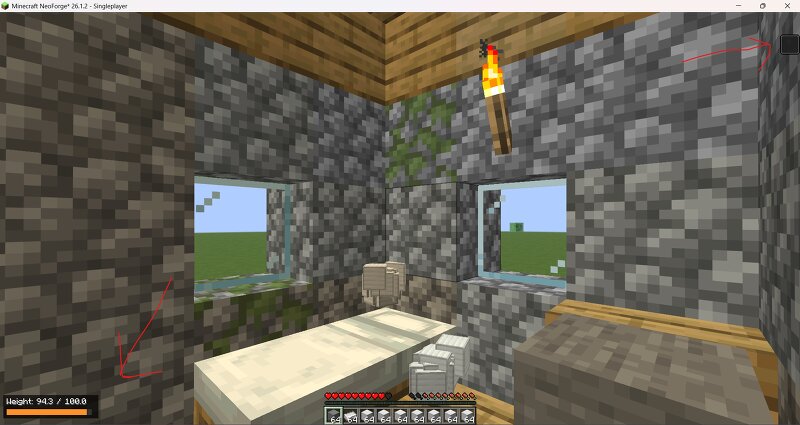
Description DUATAR: Weight adds a configurable carrying-capacity system to Minecraft. Every carried item contributes to the player’s total weight, including stacked items, equipped armor, the offhand slot, and items stored inside supported containers. Features Server-authoritative weight calculation Compact, color-coded HUD in the bottom-left corner Individual and total stack weight in item tooltips Main inventory, hotbar, armor, and offhand support Shulker Box and Bundle content calculation Progressive exhaustion and overload penalties Vanilla Slowness I, II, and III effects Reduced jumping and disabled sprinting when overloaded Configurable item and item-tag weights English and Turkish language support No external mod dependencies Item Tooltips Individual items display their unit weight: Weight: 0.27 Stacked items display both the unit and total weight: Weight: 0.27 × 10 = 2.7 Container items include the weight of their stored contents. Weight Levels 0–70%: No penalty 70–90%: Additional exhaustion 90–100%: Slowness I with a net 10% movement reduction 100–120%: Slowness II, 25% movement reduction, 15% jump reduction, and sprinting disabled Above 120%: Slowness III, 50% movement re
Added value
What’s included on this page
Preview, categories, compatibility, and tools on this page — not a bare file mirror.
- Creator
- Taso54
- Source
- Minecraft downloads library on Eaglercraft Studio
- Type
- Minecraft mod
- Price
- Free download on Eaglercraft Studio
- Curation
- Listed with credit to Taso54 · studio preview & install guide
- Game Version
- Minecraft 26.1.2
- Compatible with
- Minecraft Java (match version / loader in facts)
- Tags
- New Content, Weight
Install guide
How to install this free Minecraft mod
Eaglercraft Studio listing with metadata, creator credit, and loader-aware install guidance.
- 1Download the jar/zip when available.
- 2Install the matching loader (Forge, Fabric, or NeoForge) for your Minecraft version.
- 3Drop the mod into your mods folder, then launch with that profile.
Wrong loader or game version usually crashes on startup — read the facts on this page first.
Related free mods
More curated mods from the same library section.

Pastelmooncrafting15 · 67 diamonds · 20 views

PotatoWolfie · 60 diamonds · 2 views

PotatoWolfie · 53 diamonds · 622 views

Janss_33PL · 47 diamonds · 940 views