
Dungeonified - Minecraft Dungeons Mod for Java Edition
Creator: Kraggle09 · 2026-01-06 · Mods · Free on Eaglercraft Studio
Download Dungeonified - Minecraft Dungeons Mod for Java Edition — free Minecraft mod. Created by Kraggle09. Tagged dungeons, minecraftdungeons, new content. Check the file details for Forge, Fabric, or NeoForge before installing.
Creator notes
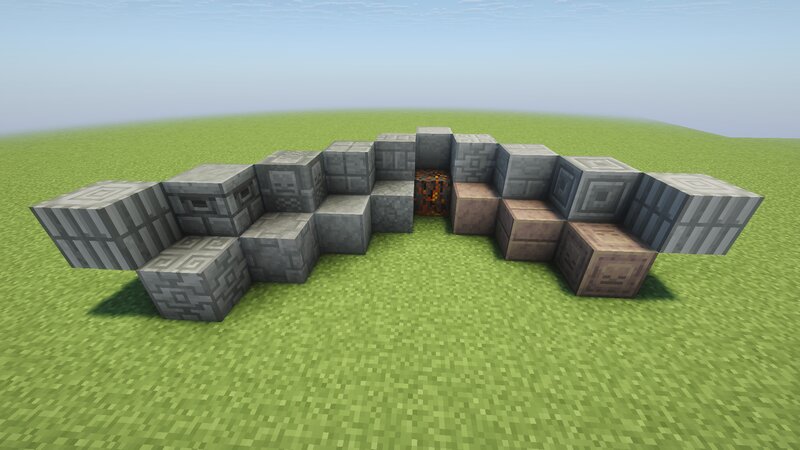
Dungeonified About the Project Dungeonified originally started as a resource pack that added Minecraft dungeons textures. It eventually evolved to include some item textures, and had block textures planned. However, I grew tired of the limitations of resource packs. For example, to add mob variants I was using the Optifine format. Which is fine for some variants (i.e. pillager visual differences) but not great for others (like the Fungus thrower Piglin, which is only accessible by naming a Piglin). So I decided to make a mod version of Dungeonified, which will allow much more features, and better support of existing ones. Current features of the mod Directly matching textures of vanilla mobs (zombie, skeleton, etc) 18 blocks, plus slab and stair variants FAQ What will happen to the resource pack? I plan to slim it down a lot; Remove all variants that don't make sense (Iceologer, Fungus Thrower Piglin, etc), leaving any variants that do make sense. I won't be adding blocks to it, and I might remove items, not sure yet. I will probably still update the pack to work on newer versions of the game, but that's it. What version of Minecraft is this for? Java Edition 1.21.1
Added value
What’s included on this page
Preview, categories, compatibility, and tools on this page — not a bare file mirror.
- Creator
- Kraggle09
- Source
- Minecraft downloads library on Eaglercraft Studio
- Type
- Minecraft mod
- Price
- Free download on Eaglercraft Studio
- Curation
- Listed with credit to Kraggle09 · studio preview & install guide
- Game Version
- Minecraft 1.21.1
- Compatible with
- Minecraft Java (match version / loader in facts)
- Tags
- Dungeons, Minecraftdungeons, New Content
Install guide
How to install this free Minecraft mod
Eaglercraft Studio listing with metadata, creator credit, and loader-aware install guidance.
- 1Download the jar/zip when available.
- 2Install the matching loader (Forge, Fabric, or NeoForge) for your Minecraft version.
- 3Drop the mod into your mods folder, then launch with that profile.
Wrong loader or game version usually crashes on startup — read the facts on this page first.
Related free mods
More curated mods from the same library section.

Pastelmooncrafting15 · 67 diamonds · 20 views

PotatoWolfie · 60 diamonds · 2 views

PotatoWolfie · 53 diamonds · 622 views

Janss_33PL · 47 diamonds · 940 views