
Economies
Creator: Badbull64 · 2026-08-29 · Mods · Free on Eaglercraft Studio
Download Economies — free Minecraft mod. Created by Badbull64. Tagged economy, multiplayer, other. Check the file details for Forge, Fabric, or NeoForge before installing.
Creator notes
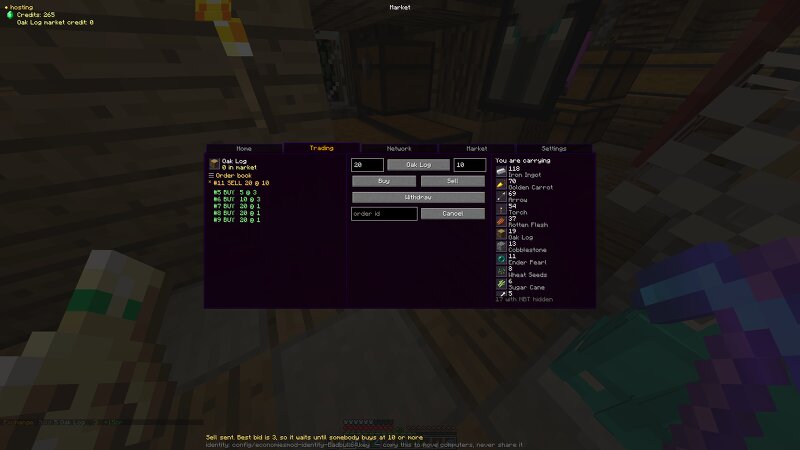
Create markets and trade items across separate Minecraft worlds Fabric mod for 1.16.5 (will port to other versions at some point) that creates a shared, player-run economy. The exchange itself uses a real order book, so if you list 20 iron at 5 credits, someone bids 6; the trade settles at 5, and whatever's left over stays on the book until it fills too. There are two ways to get a market working: either use a dedicated server to act as the central authority or host it from inside your own game, where hosting can pass between different players. Everyone has their own copy of the current market state. Different market events (so item deposits, withdrawals, trades, etc) are signed and chained together, so a host can't create credits or delete a trade without the other copies detecting that the histories no longer agree. ## Github Check this for more detail on the mod, since it provides necessary info on the mod setup: Changelog: Changed a couple of things on the market screen, mostly the colour to grey, and shuffled the layout around. [github]( https://github.com/badbull643/economies-mod )
Added value
What’s included on this page
Preview, categories, compatibility, and tools on this page — not a bare file mirror.
- Creator
- Badbull64
- Source
- Minecraft downloads library on Eaglercraft Studio
- Type
- Minecraft mod
- Price
- Free download on Eaglercraft Studio
- Curation
- Listed with credit to Badbull64 · studio preview & install guide
- Game Version
- Minecraft 1.16.5
- Compatible with
- Minecraft Java (match version / loader in facts)
- Tags
- Economy, Multiplayer, Other
Install guide
How to install this free Minecraft mod
Eaglercraft Studio listing with metadata, creator credit, and loader-aware install guidance.
- 1Download the jar/zip when available.
- 2Install the matching loader (Forge, Fabric, or NeoForge) for your Minecraft version.
- 3Drop the mod into your mods folder, then launch with that profile.
Wrong loader or game version usually crashes on startup — read the facts on this page first.
Related free mods
More curated mods from the same library section.

Pastelmooncrafting15 · 67 diamonds · 20 views

PotatoWolfie · 60 diamonds · 2 views

PotatoWolfie · 53 diamonds · 622 views

Janss_33PL · 47 diamonds · 940 views