
Endless analog horror
Creator: Sergey7363635 · 2026-09-02 · Mods · Free on Eaglercraft Studio
Download Endless analog horror — free Minecraft mod. Created by Sergey7363635. Tagged analoghorror, horror, mod, new content. Check the file details for Forge, Fabric, or NeoForge before installing.
Creator notes
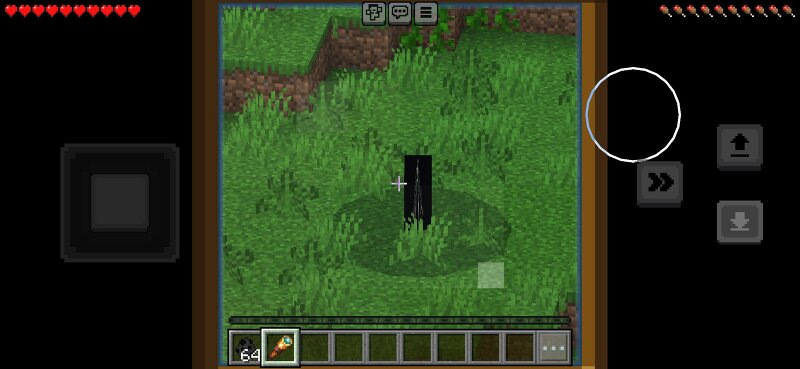
Endless - Tall Horror Entity A terrifying tall horror entity that stalks you from the darkness. Always watches. Always follows. Endless is a horror add-on that adds a tall, slender creature to your Minecraft world. This entity is inspired by classic horror figures — extremely tall, thin, and unsettling. It uses a billboard model so it always faces the player, creating a constant feeling that it’s watching you. Features:- Extremely tall horror entity- Always looks directly at the player- Long detection range — it can notice you from far away- Aggressively stalks the player- Breaks many blocks when close (doors, wood, glass, dirt, leaves, fences and more)- Spawns at night in forests, taiga, plains and hills- High health- Attack applies Spowness- Custom spawn egg How to install:1. Download the .mcaddon file2. Open it with Minecraft3. Activate both the Resource Pack and Behavior Pack in your world4. Recommended: play on Hard difficulty at night The entity is designed to create tension. It doesn’t just attack — it watches, follows, and slowly closes the distance while destroying obstacles in its path. Perfect for horror maps, survival challenges, or just making your nights more terrifyi
Added value
What’s included on this page
Preview, categories, compatibility, and tools on this page — not a bare file mirror.
- Creator
- Sergey7363635
- Source
- Minecraft downloads library on Eaglercraft Studio
- Type
- Minecraft mod
- Price
- Free download on Eaglercraft Studio
- Curation
- Listed with credit to Sergey7363635 · studio preview & install guide
- Game Version
- Minecraft 26.3 snapshot
- Compatible with
- Minecraft Java (match version / loader in facts)
- Tags
- Analoghorror, Horror, Mod, New Content
Install guide
How to install this free Minecraft mod
Eaglercraft Studio listing with metadata, creator credit, and loader-aware install guidance.
- 1Download the jar/zip when available.
- 2Install the matching loader (Forge, Fabric, or NeoForge) for your Minecraft version.
- 3Drop the mod into your mods folder, then launch with that profile.
Wrong loader or game version usually crashes on startup — read the facts on this page first.
Related free mods
More curated mods from the same library section.

Pastelmooncrafting15 · 67 diamonds · 20 views

PotatoWolfie · 60 diamonds · 2 views

PotatoWolfie · 53 diamonds · 622 views

Janss_33PL · 47 diamonds · 940 views