
Enemy Extreme
Creator: Tjopix · 2026-04-10 · Mods · Free on Eaglercraft Studio
Download Enemy Extreme — free Minecraft mod. Created by Tjopix. Tagged other. Check the file details for Forge, Fabric, or NeoForge before installing.
Creator notes
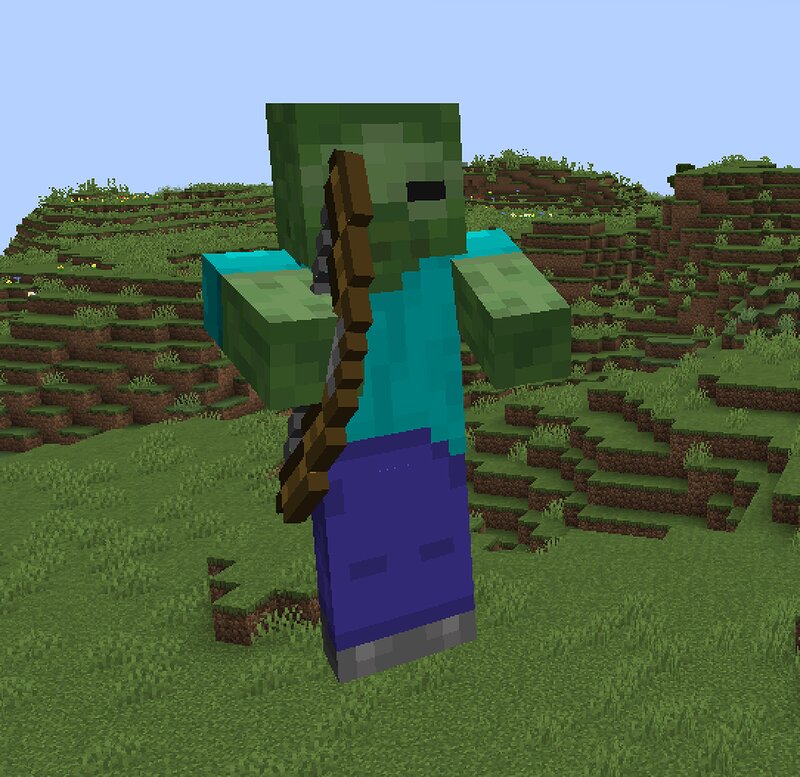
Enemy Extreme This mod adds new vanilla zombies without being too over-the-top. Perfect for zombie apocalypses. Compatible with all mods and resource packs! Here is a detailed overview of all the features, zombies, and their special abilities in the Enemy Extreme mod (excluding the commands): 🧟♂️ General Mod Features (Apply to all Extreme Zombies) No Sunlight Burning: Unlike normal zombies, the Extreme variations do not burn in daylight. They are a constant threat during the day. Door Breaking: Every Extreme Zombie is able to actively attack and break wooden doors. Alliances: All Extreme variants are allied with each other and do not infight. Spawn Conditions: They spawn normally in the world just like other monsters during the night or in dark areas (light level below 2). They are not restricted to any specific biomes and can spawn globally. 🩸 The 8 Extreme Zombie Variants and Their Abilities Tank Zombie Equipment & Ability: Spawns wearing a full set of Iron Armor and wields a Stone Sword. He can take a massive beating and hits very hard. Stats: 40 Health (double the normal amount), 10 Armor points, 6 Attack Damage. Weakness: He is significantly slower than a normal zombie. 2. Sn
Added value
What’s included on this page
Preview, categories, compatibility, and tools on this page — not a bare file mirror.
- Creator
- Tjopix
- Source
- Minecraft downloads library on Eaglercraft Studio
- Type
- Minecraft mod
- Price
- Free download on Eaglercraft Studio
- Curation
- Listed with credit to Tjopix · studio preview & install guide
- Game Version
- Minecraft 1.20.1
- Compatible with
- Minecraft Java (match version / loader in facts)
- Tags
- Other
Install guide
How to install this free Minecraft mod
Eaglercraft Studio listing with metadata, creator credit, and loader-aware install guidance.
- 1Download the jar/zip when available.
- 2Install the matching loader (Forge, Fabric, or NeoForge) for your Minecraft version.
- 3Drop the mod into your mods folder, then launch with that profile.
Wrong loader or game version usually crashes on startup — read the facts on this page first.
Related free mods
More curated mods from the same library section.

Pastelmooncrafting15 · 67 diamonds · 20 views

PotatoWolfie · 60 diamonds · 2 views

PotatoWolfie · 53 diamonds · 622 views

Janss_33PL · 47 diamonds · 940 views